- Solution exception:‘NoneType’ object has no attribute ‘identifier’
“I add apertures to the HB Model and it gives this error. What should I do?”
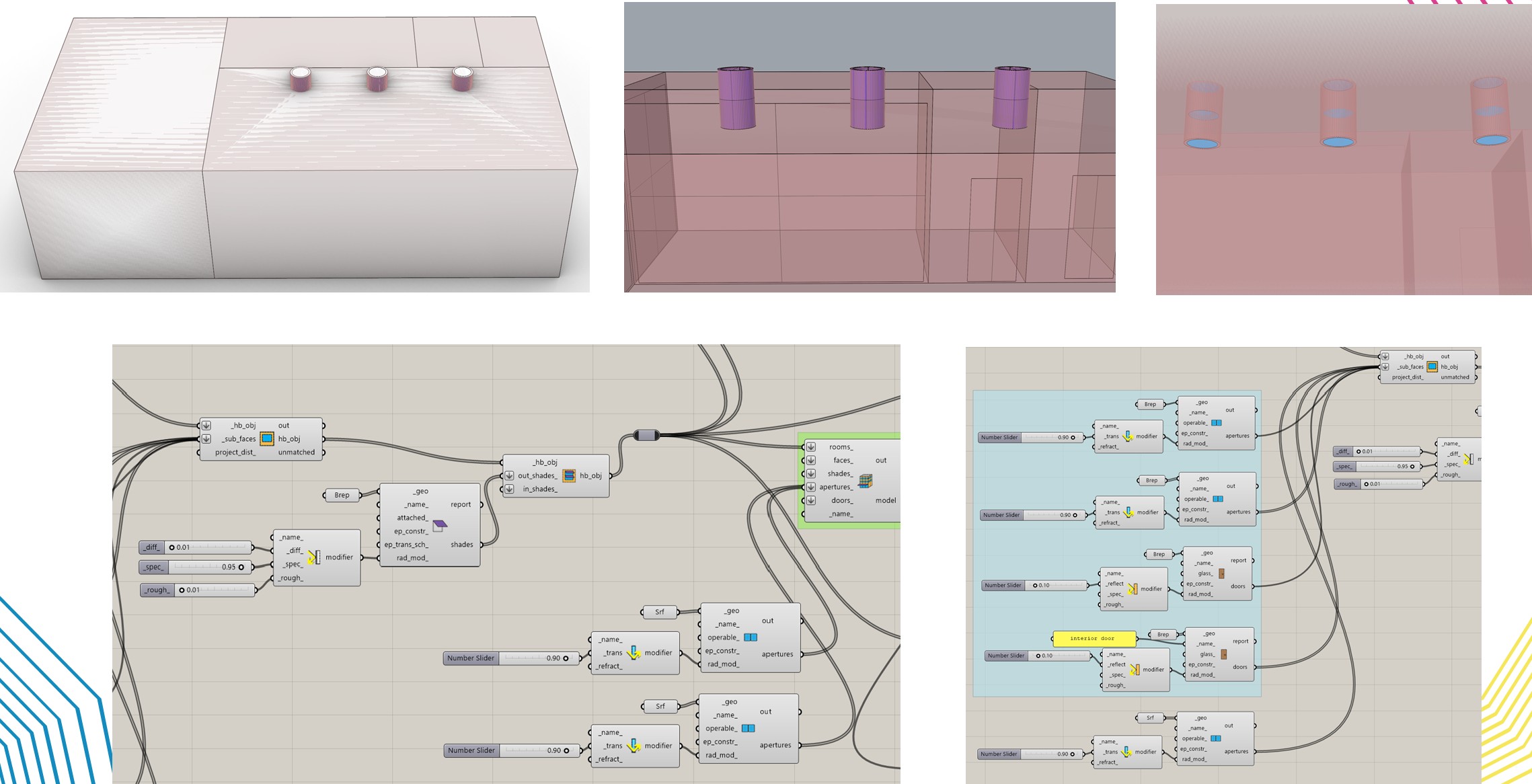
I want to design three solar light tubes installed in the ceiling, as shown in the image. The tube section also extends down into the building (the purple-colored part) and is made of a highly reflective material. Both the top and bottom ends of the tube are made of high-transmittance glass. The connection point between the tube and the roof is also an opening (a hole). However, Honeybee requires closed solids, so I cannot create an actual void. For this reason, I modeled this part as if there were glass there as well.
I defined the reflective tube part as a shade. I also connected the glass at the top and bottom directly to the HB model. Honeybee Radiance accepted these glass elements even though they were not previously mentioned in the program, but the Honeybee Energy part does not accept them. How should I define these glass elements?
Also, how can I create a void?
When designing a solar light tube, how should I define
- the tube part,
- the glass part, and
- the void part?
I would be very happy if you could help. Thanks
Hey! I see what you’re trying to do
The main issue is that HB Energy / EnergyPlus is much stricter than Radiance.
EnergyPlus usually fails with:
- true curved geometry (perfect cylinders)
- intersecting/overlapping solids
- boolean “voids” (real holes cut out of faces)
Recommended workflow
1) Reflective tube part
Don’t model it as a perfect cylinder. Instead, approximate it with a faceted tube:
- 8 planar faces = lightweight
- 12/16 faces = smoother but heavier
This keeps everything planar, which EnergyPlus can handle.
2) Glass at top and bottom
The glass must be defined as Honeybee Apertures (sub-faces) inside a planar roof/ceiling face (window-type surface).
Radiance may accept “floating glass”, but HB Energy won’t.
3) The void / hole
EnergyPlus does not support boolean voids.
The “hole” should simply be an aperture in the roof face.
Tip: if the top part is only for daylight (and you don’t need thermal simulation), you can model it as a Shade in HB Radiance.
Thank you for your comment.
Should I define the reflective part as a room or as a shade? The shade option doesn’t allow me to add glass. I understand that the top and bottom glass should be defined on a defined surface, but where exactly should I place it?
Also, I understand that a hole won’t be created, so I should create an aperture instead, but I’ll define glass for that opening, right? What type of glass should it be so that it has the closest properties to the hole? Can you help me a bit more? I’m really confused.