Hi Chris! We’re wondering if its possible to expose the Gravity arrow input in fairyfly… we’re doing NFRC calcs and realized we have to jump out and manually set the gravity arrow in THERM and resimulate… unless there is a setting somewhere I am missing?
To add to @grahamjlinn’s request, it would be extremely useful to at least know, if we cannot change the direction of gravity, what the default assumption is within Fairyfly.
Edit: The default gravity vector direction in Firefly seems to be down.
I am glad that this has come up because I have a question for you about how I should implement this. You are correct that, right now, the gravity arrow is always down, which I know is not always correct but I temporarily set it up like this to prompt people to notice it and ask about it.
My initial idea for setting the default gravity arrow for the fairyfly model was to leverage the fact that (unlike the 2D THERM canvas), fairyfly is working in the 3D environment of Rhino. So I was thinking to set the default gravity arrow based on how everything is arranged in the 3D rhino scene. If the plane of the Fairyfly model is in the World XY, the gravity arrow of the exported THMZ will be “Into the Screen.” If the plane of the fairyfly model is in something like the World XZ plane, the gravity arrow will be down. With this idea, people can build fairyfly models by making corss-sections of parts of a 3D model and, if they do it like this, the gravity arrow will always be correct (or as close to correct as you can get if the plane isn’t perfectly vertical or horizontal).
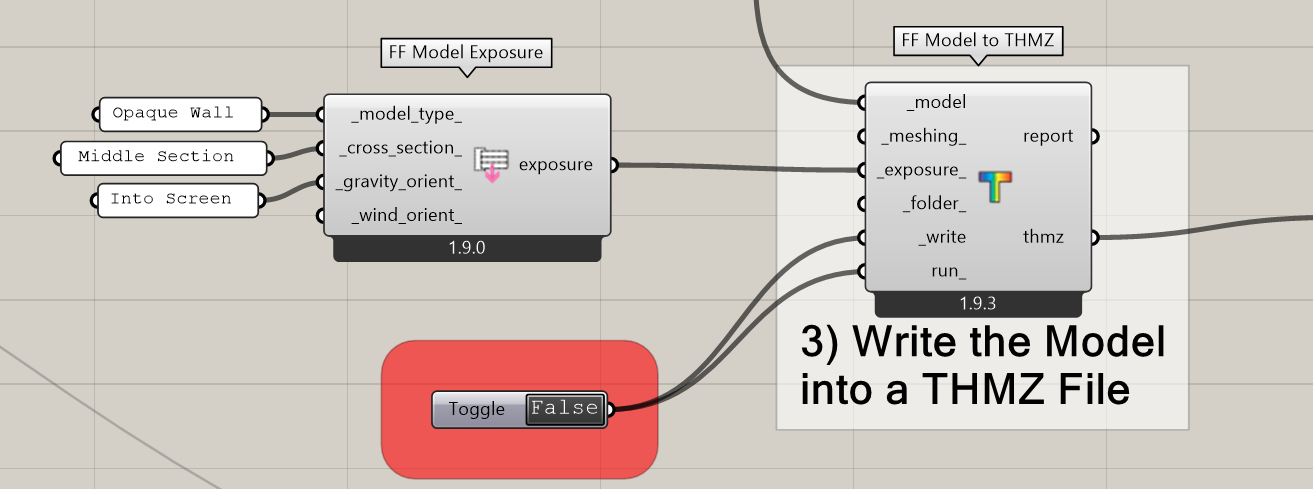
Of course, I can always add an input to the “FF Model to THMZ” component to override this default gravity arrow if, for example, you constructed a vertical building section in the Rhino World XY plane and you don’t want to move it. I realize that just adding this would be enough to satisfy your main use-case here. And I have already seen a couple of Fairyfly models of building sections in the World XY plane so I know something like this is needed.
But, before I add the ability to override the gravity arrow I wanted to ask - do you think it is helpful to have the default gravity arrow set based on the orientation of the model in the 3D Rhino scene? Or is this more confusing than it is helpful such that a better default would be something like “Always down” or “Always into the plane of the screen” as it kinda is now?
Once I know the answer to this, I can implement everything when I get the chance.
Thanks Chris!! Very creative approach! It definitely appeals to me to leverage Rhino’s inherent 3D interface in this way.
One concern I would have would be quality assurance… the project that I am supporting with Ale is going to be a high volume of therm details (between 50 and 100) and double checking gravity arrow by staring at the Rhino interface and interpreting XZ versus XY plane might be a slight cognitive load
Also the cross section setting (jamb, sill, etc) and gravity arrow setting have to be coordinated for reasons I am not educated enough to explain… so interface wise it might be easier to have those two settings side by side in a grasshopper component.
(In fact THERM occasionally rejects a given cross section / gravity arrow combination??? I am no THERM expert, someone else can explain why this occurs. In this scenario THERM makes you “override” the default gravity arrow direction associated with a given cross section type so we probably would need that override capability in the grasshopper component too)
Oof this is a bit complex!
Thanks for you fantastic work Chris and Ladybug team!!
I think you are right that, if I expose the gravity arrow, I’ll need to expose everything else in the Model Exposure menu (ideally with checks on the front end to ensure that the choices of these attributes are all compatible before sending the model off to THMZ):
Technically speaking, this is not very hard and I’ll see if I can do this all before the LBT 1.10 stable release. But, now that I see how inter-related these exposure properties are and that a lot of them have to do with what the model is made of rather than being purely geometric properties, maybe we just keep the Fairyfly defaults something static rather than trying to infer them from the 3D orientation in Rhino. At least for now.
FYI, if you have 50-100 THERM models that you’re exporting from Fairyfly all with the same model exposure properties, you can work around the current limitation by editing the XML file here in a text editor:
You’ll see the Model exposure properties that fairyfly uses are in this part of the xml:
So editing the XML and restarting Rhino will cause Fairyfly to export all of your THMZ files with whatever you have changed those model exposure properties to.
As you can see, it allows you to override all of those properties in the Model Exposure section. I ended up setting the default gravity vector based on the orientation of the model in the Rhino scene and this seems to be fine as we use the “Other” Model type along with the “General Cross Section” by default. So, by default, these fields are very generic but you can override them to be more specific as you wish.