I am currently using UWG model for an urban heat island simulation study, and I’ve encountered some issues while setting up the building program and schedule.
From what I understand so far:
In the “Assign Building UWG Properties(BuildingUWG)” component, it is required to select one of the 16 reference building types for building program (for example MidriseApartment, LargeOffice).
The MidriseApartment building program seems to have an HVAC schedule that runs 24 hours per day, with a cooling setpoint of 24.4°C and a heating setpoint of 21.7°C.
However, I would like to customize the schedule, for example, the HVAC operates only from 8 PM to 6 AM, and change the cooling setpoint to 26°C.From previous discussions, it seems that custom schedules may be modified via the JSON, but I’m not entirely sure how to do it.
So, I’d like to ask:
If I customize the building program and schedule in the “BuildingSolid” component, will they be overridden by the program in the “BuildingUWG” component after connecting it ?
Is there any other way to modify the HVAC schedule?
If editing the JSON is the only way, from which part should I modify it? And what should I write in the JSON file?
Thank you very much for your help!
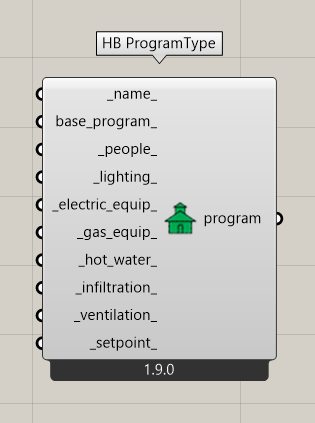
You can create your own program type with this component:
You can set the minimum ventilation and the setpoint.
Hopefully that is helpful.
best
-trevor
I have tried to use this component to set the setpoint temperature and schedule, and assigned it to the “Building Solid” component, and then connecting it to the “Building UWG” component.
However, the resulting morphed epw file showed no change.
I suppose this is because once connected to the “Building UWG” component, the simulation will use one of the 16 reference building types for building program, which causes my custom schedule to be ignored.Is my assumption correct?
Are there other options can change the HVAC schedule for the UWG model?
Sorry for the late reply here, @kelvin . Your assumption here is correct:
With that said, it is possible to fully specify your own schedules and internal building loads by manually editing the JSON file that Dragonfly writes to your machine as input for the UWG. The schema of this JSON file can be found here:
… and, if you look closely at it, you will find that there are fields to specify schedules and other criteria, which can override the default values supplied by the selected reference buildings. But none of this is currently exposed in Dragonfly and it is a lot of work to do so.
If you run some tests with a few different reference building types, you will see that the impact that internal building loads have on the urban heat island effect is typically pretty small. All of this makes it hard to justify sinking so much time into exposing something that we know tends to have a small effect. At least compared to the effect of urban geometry, urban materials, and anthropogenic heat from traffic.
If there is one input exposed that can help you account for the overall impact of people running their air conditioners, it is the fr_canyon_ input on the DF Assign Building UWG Properties component. Setting that to zero is kinda like removing all of the waste heat rejected by air conditioners of the buildings from the UWG simulation. So you can kinda use that as a proxy for setpoint.
If you end up going down the route of editing the UWG JSON file written by dragonfly, let us know.