Fails to find CuPY / CUDA dll no matter the version

hi @chris @MingboPeng Honeybee recipe’s are failing to load CuPY and CUDA when running scripts. I have tried various combinations of Cupy/CUDA to no avail. I receive one of the following errors:

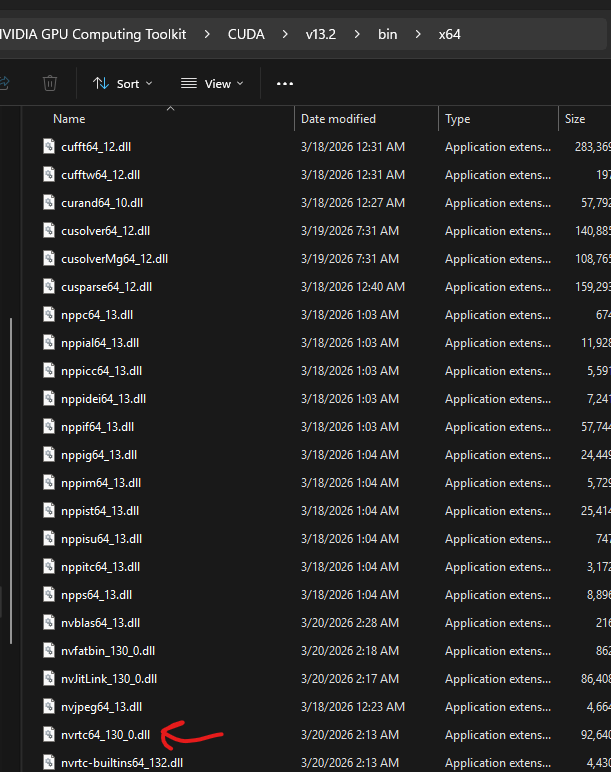
FileNotFoundError: Could not find module ‘nvrtc64_130_0.dll’ (or one of its dependencies). Try using the full path with constructor syntax.

Falling back to NumPy (1.26.4) in honeybee-radiance-postprocess: CuPy failed to load nvrtc64_120_0.dll: FileNotFoundError: Could not find module ‘nvrtc64_120_0.dll’ (or one of its dependencies). Try using the full path with constructor syntax.

I know both are same error pointing to different versions of that DLL, and that is because in an effort to get this to work I have tried installing multiple versions of CUDA and CuPY to no avail.

I see on the github here, it says that this is a known error, but not how to fix it:

image

image1056×155 8.6 KB
If I run nvidia-smi on my machine I get this:

image

image746×38 1.24 KB

indicating to me that my GPU supports up to CUDA 13.1

I am running an RTX Pro Blackwell 3000 GPU on this laptop. Latest NVidia Drivers.

I made sure that CUDA is in the path in environmental variables:

image

The DLLs are clearly here:

It seems though that the component / script cannot find it, or is looking in the wrong place, or is looking for the wrong version of CUDA.

Is it that CuPY has not caught up to this newest gen of blackwell gpu’s ?

If I check CuPY I see I have it installed, both 13x and 12x versions:

So not sure how to resolve that?

Another question, the comfort script recipe that is in the LB recipe template component for HB (Comfort under a tree), when I use that with my own geometry of 2 buildings and a podium, running with 2,000 sensors for a 4hr period on one day, it takes approximately 1hr to run. Is this normal? Would Cupy/CUDA speed this up? Seems awfully long to run that.

p.s. it seems like the link you have in the running log of HB UTCI map when it runs pointing to the CUDA.md page on github has been moved, it gives a “404 not found”, I found it manually looking in the directory of the github:

image

image1433×873 72.1 KB

cc @jackD

Hi @remyweather,

nvrtc64_120_0.dll in the error message suggests that your honeybee-radiance-postprocess is using cupy-cuda12x, which is the version that ships with the library. Because of this you need CUDA Toolkit 12.x.x – here is the latest version.

You can run it with CUDA Toolkit 13.x.x, but then you need to install cupy-cuda13x in the Python environment used by honeybee-radiance-postprocess – in LBT that would be this path by default: C:\Program Files\ladybug_tools\python\Lib\site-packages.

That is correct – and you can still use older versions of CUDA Toolkit.

This will only speed up the post-processing, so the answer is no. Perhaps the recipe is running for a long time because of the energy simulation.

Thank you. I will fix this.

Hi @mikkel seems like installing the CUDA 12.9 (I had tried 12.1, 13, 13.1, 13.2) did the trick:

2026-05-05 12:17:49 INFO: Using CuPy (13.6.0) for GPU (NVIDIA RTX PRO 3000 Blackwell Generation Laptop GPU) acceleration in honeybee-radiance-postprocess.

However it seems to be using CuPy 13.6 with CUDA 12.9, I guess that is OK?

If I wanted to run it with CUDA Toolkit 13.xx, how do I install cupy-cuda13x in the python environment? I do not know how to install things into a specific python env?

thank you.

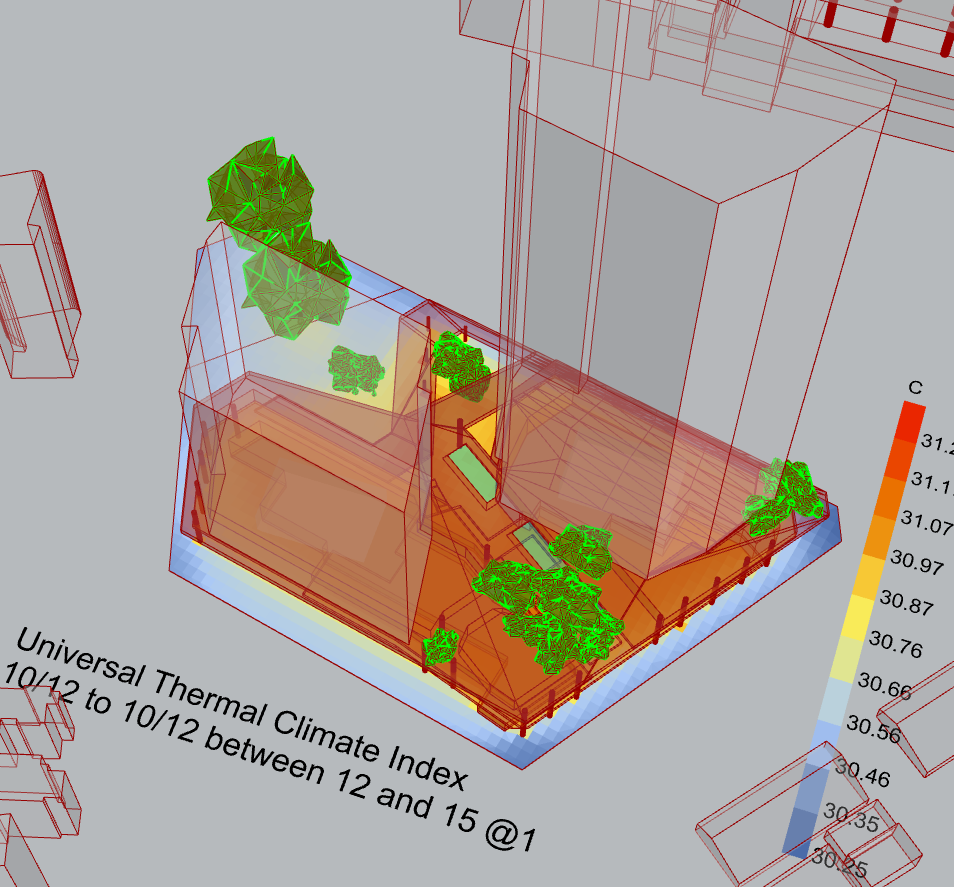
As for the speed, here is a screenshot of the model:

The sensors are 3m resolution, 2,000 sensors total. 4hr period of simulation over one day.

Are there settings or ways to limit how much HB simulates on the e+ side to speed up the simulation?

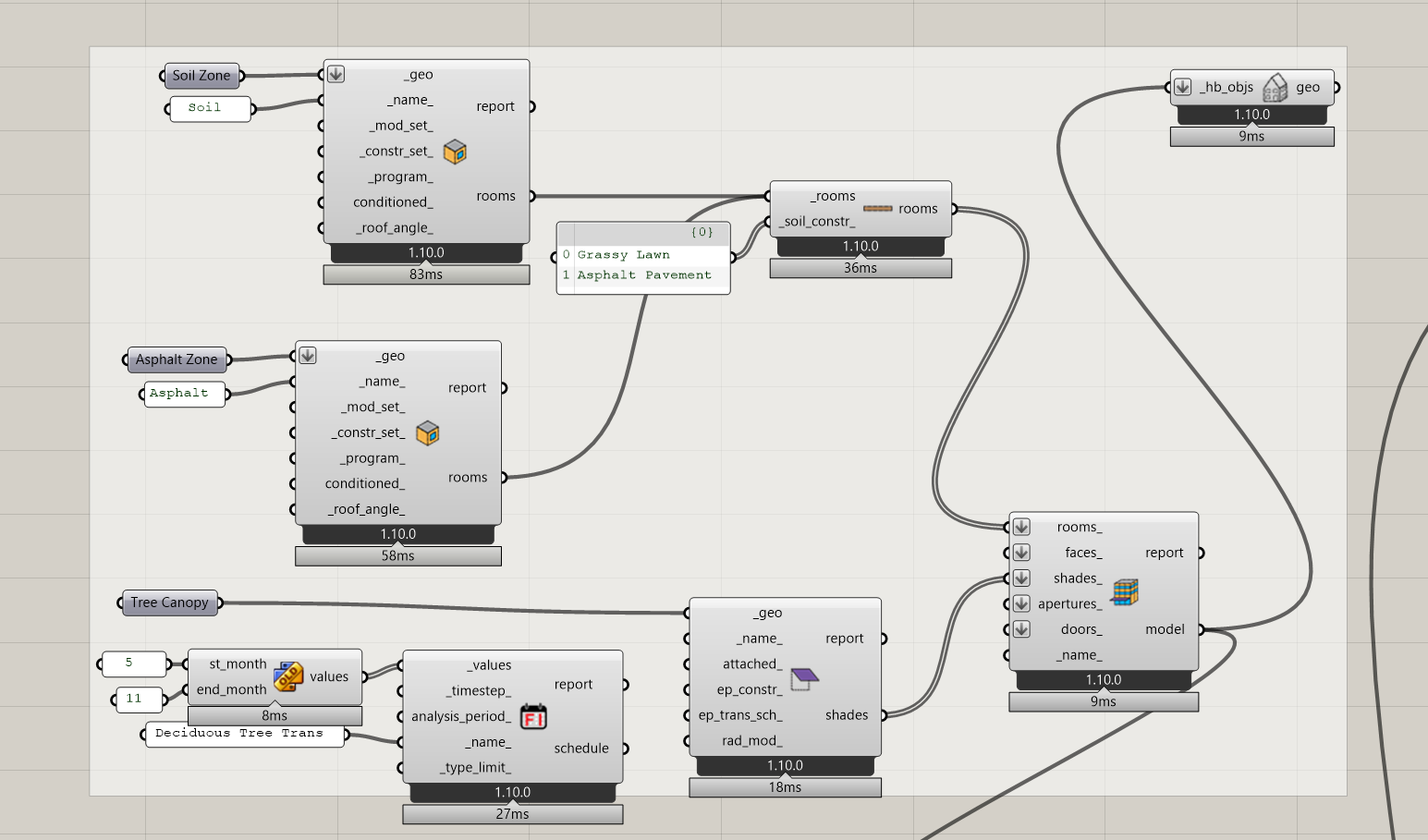
As far as inputs go its :

1 soil zone brep

1 asphalt zone brep

1 analysis sfc

46 breps representing the two towers / podium / roof

31 breps representing the context buildings

18 meshes representing the trees

This simulation took from 12:16 - 12:53 so 37 minutes.

I see – all these different versions can be confusing. It is version 13.6.0 of cupy-cuda12x. It’s just a coincidence that it’s 13.6.0 which adds to the confusion between 12 and 13. E.g., the latest version of cupy-cuda12x is 14.0.1 so this is not related to 12x/13x, it is just the version of cupy itself.

Try to run the following in your CMD (perhaps as administrator): "C:\Program Files\ladybug_tools\python\python.exe" -m pip install --force-reinstall "numpy<2" "cupy-cuda13x"

@chris will be able to tell if there are any ways to speed it up for this scenario.

oh gosh, yes, this is so confusing. Thanks for clarifying. Taking notes.

Thank you, will give a try.

And thanks, hopefully Chris has some insight.

Some more insight, I just ran a test UTCI sim:

500hr period of analysis

11,320 pts of analysis

no custom weather, just epw, using LB components for UTCI, MRT, Human/Sky Relationship

30 minutes to run and plot.

So hence it seems fishy to me that the HB recipe, which runs outside of GH, should take 37-40min with only 2,000 sensors, 4hr period of analysis, if I am not doing something wrong in the setup.

Hey @remyweather .

If there are any Honeybee Rooms in your model here for UTCI sim, then running for just a 4-hour period is a waste of time. EnergyPlus needs to warm up by simulating the first day 5-6 times usually. So if you are running the UTCI period for anything less than a week, you might was well run it for a week since it’s going to be more or less the same runtime.

Alternatively, if you just set up your Honeybee Model without any rooms, you’ll find that the UTCI recipe runs a lot faster fi you only do 4 hours since, then it is only a Radiance simulation without using E+ to compute surface temperatures. And Radiance doesn’t have a big warmup time the way E+ does.

@Chris, clearly I do not understand well enough then how to setup the script with HB, since I have never used it before really.

I took the recipe in the LB recipe folder on GH, and just applied my own geometry.

A BREP with ~0.1m thickness (since it needs to be closed brep) for soil

A BREP with 0.1m thickness for Asphalt

Ignore “Tree Canopy”, inside that are all my context building shades.

Are you saying to skip the rooms all together? then where do I put the different surface zones into?

thanks