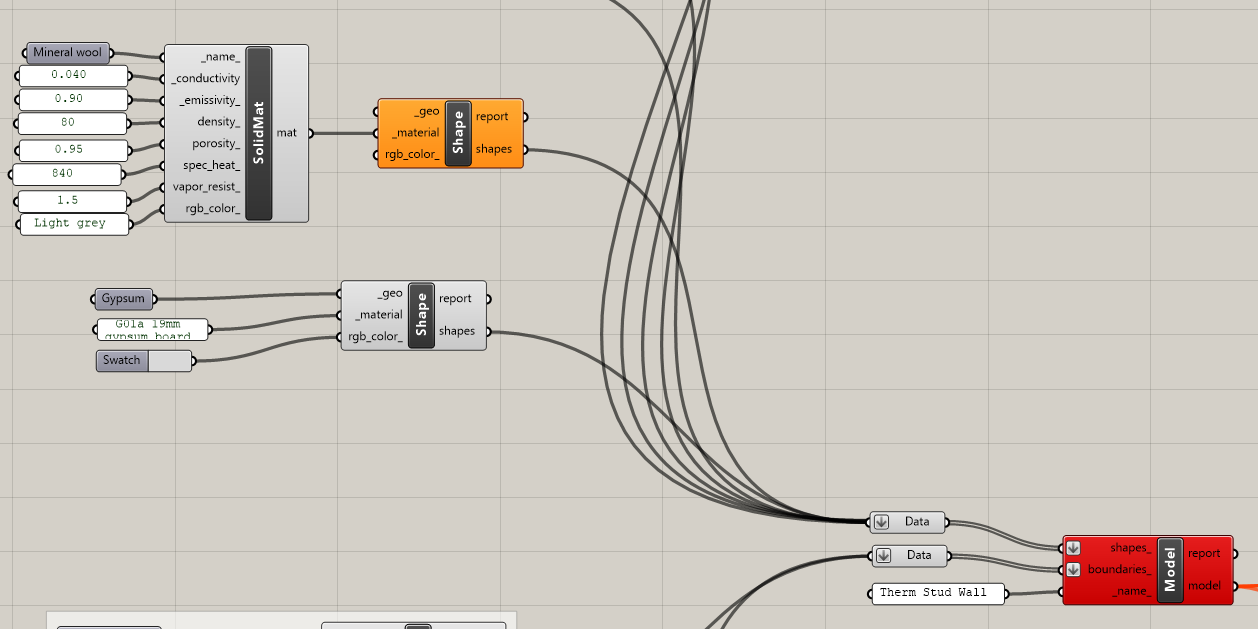
I’m a beginner Rhino/Grasshopper + Ladybug Tools user. I’m trying to run a THERM simulation using the new Fairyfly components (THERM 8.1 / LBT 1.10), and I’m currently creating my own custom materials (e.g., mineral wool, gypsum, etc.) using the SolidMat component.
My problem is: the Fairyfly Model component becomes red (fails), so the simulation cannot run. I’m not sure if the issue is coming from:
- my custom material inputs (missing/invalid values),
- the geometry connected to
_geo(curves vs closed regions, gaps, overlaps), - or data tree structure (flatten/graft mismatch between shapes and boundaries).
Could you please advise what I should check first, and what the most common causes are when the Model component turns red?
Thank you very much!