Dear Ladybug Tools community,
We’re happy to share that honeybee-radiance-postprocess can now use your GPU for post-processing through CuPy 
If you have a compatible NVIDIA GPU, post-processing can run faster, especially for large sensor grids.
This feature is optional and automatic:
- If GPU support is available, it will be used
- If not, everything continues to work as before using the CPU
No changes to your scripts are required.
Install honeybee-radiance-postprocess
To get the newest version of honeybee-radiance-postprocess you have to update your core libraries. You can do that either with LB Versioner, or with the latest version of the Pollination single-click installer for Grasshopper or Rhino.
 Do I need to install anything?
CuPy is already shipped with honeybee-radiance-postprocess. You do not need to install CuPy manually.
However, GPU acceleration does require one additional system dependency:
 CUDA Toolkit (Required)
To use your GPU, you must have the NVIDIA CUDA Toolkit installed on your system.
- The CUDA Toolkit is provided by NVIDIA
- It enables software like CuPy to run computations on the GPU
- If it is missing or incompatible, honeybee-radiance-postprocess will automatically fall back to CPU processing
Because honeybee-radiance-postprocess ships with cupy-cuda12x, you need CUDA Toolkit version 12.x.x installed on your machine (the latest version is CUDA 12.9.1). Before installing CUDA Toolkit please check the latest compatible version for your GPU driver. See more about this here.
Why CUDA 12 (and not the newest CUDA 13)?
The initial release targets CUDA 12 to support the largest number of users.
CUDA 13 drops support for some older GPUs. By targeting CUDA 12, more users can try GPU acceleration without upgrading hardware or GPU drivers.
This choice may change in future releases as newer GPUs become more common.
 When will GPU be helpful?
GPU acceleration is most beneficial for simulations with a large number of sensors.
For smaller studies, the overhead of using the GPU can outweigh the benefits, so performance may be similar to or slightly slower than CPU-based processing. This is expected behavior.
Rule of thumb:
 Large sensor grids or many sensor grids → likely faster
 Small sensor grids or few sensor grids → little or no benefit
 FAQ
FAQ
How do I know if my GPU is compatible?
CuPy supports GPUs with compute capability ≥ 3.0. Read more about compute capability here.
If you are still unsure, please ask.
Can I use CuPy with an AMD GPU?
If you have an AMD GPU please read this.
How can I tell if honeybee-radiance-process is using CuPy and not NumPy?
honeybee-radiance-postprocess will print a line that tells you if CuPy is being used. You should see something like this:
Using CuPy (13.6.0) for GPU (NVIDIA GeForce RTX 3080) acceleration in honeybee-radiance-postprocess.
In Grasshopper the post-processing components will also report this statement in the report output.
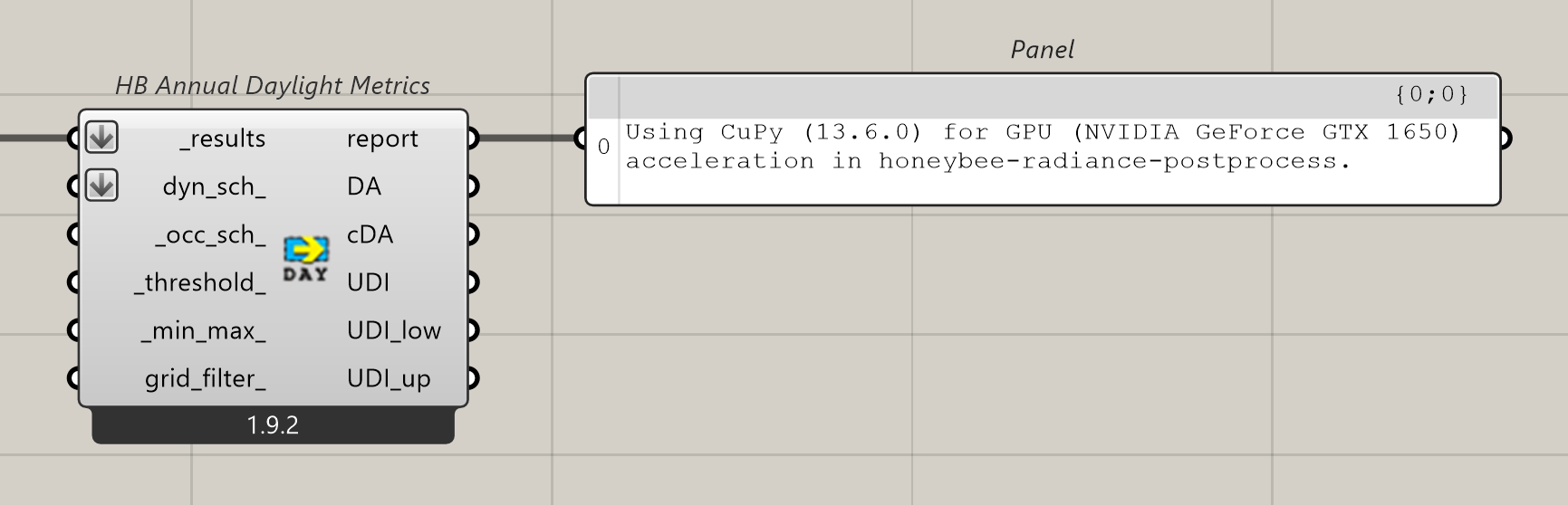
If CuPy is installed but fails during initialization honeybee-radiance-postprocess will fall back to NumPy. If this happens you should see a statement similar to this:
Failed to load CuPy successfully. Falling back to NumPy (1.26.4) in honeybee-radiance-postprocess

