anyone else running into high ACH rates when having the windows set to always open ?
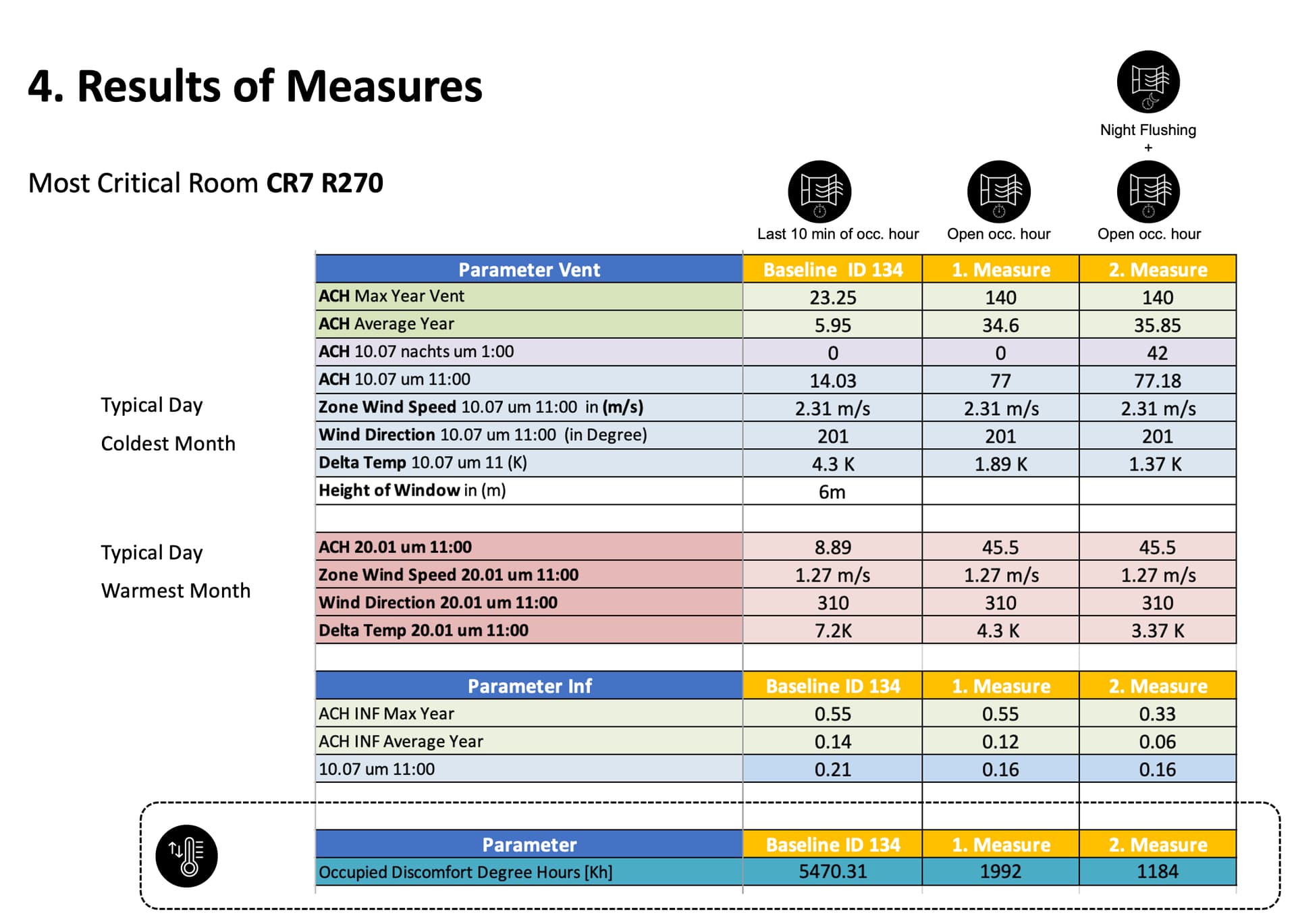
Does possibly anyone have any idea why my ACH rates could be so high ACH 77 plus and if thats normal ? Could it be that the AFN Component is simply not the right thing to asses this? When using the HB Window Opening the ACH rate is 110 ACH.
My Situation:
We are currently simulating a classroom in Lagos, Nigeria in energy plus with honeybee and I am researching how the duration of window opening, the size and placement of the window affect the adaptive thermal comfort performance.
For this, I output my ACH Rate results to see with which values Energy Plus is calculating.
I ran into the following Issue: The moment my window is open during the entire occupancy time, I get ventilation rates of up to 77 ACH per hour using the Honeybee AFN and when I use the HB Window Opening I get Values up to 110 ACH. But also when I only have the window open for 10 min per hour, I get average rates of 14 ACH. This seems too high.
These are my input parameters and I also attached the results of my simulation and the ACH rates at different times of the year.
Input Parameters:
Classroom: 9 m x 7m x 2.4 m
Windows on opposite sides.
Inlet and Outlet Window with a Size of 4.32m2 (total 8.64m2)
Discharge Coefficient of 0,45 (to account for the metal bars and the friction of the window frame)
For the Output Parameters I included Local Wind Speed, Temp Delta, and the Wind direction.
Cd = opening type
V= Volumetric flow rate
stack component = airflow driven by temperature difference between inside and outside.
A=(Window Area)×(Operable Fraction)×(Opening Schedule)
Opening Type
Cd
Sharp-edged opening
0.60–0.65
Window (tilt/slider)
0.50–0.65
Large clean opening
0.65–0.70
Louvered opening
0.25–0.40
IF window open fraction is 1.0, wind speed is moderate, open area is large or no max flow cap is defined:
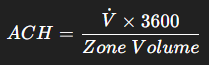
energyplus will calculate the airflow from: V = Cd * A * Vwind + stack component
if I’m not mistaken your ACH is really high because the window is open all the time and that allows for the temp difference in/out and wind speed to drive a high airflow rate
yes there could be some errors, here the report file i don’t quite understand it.
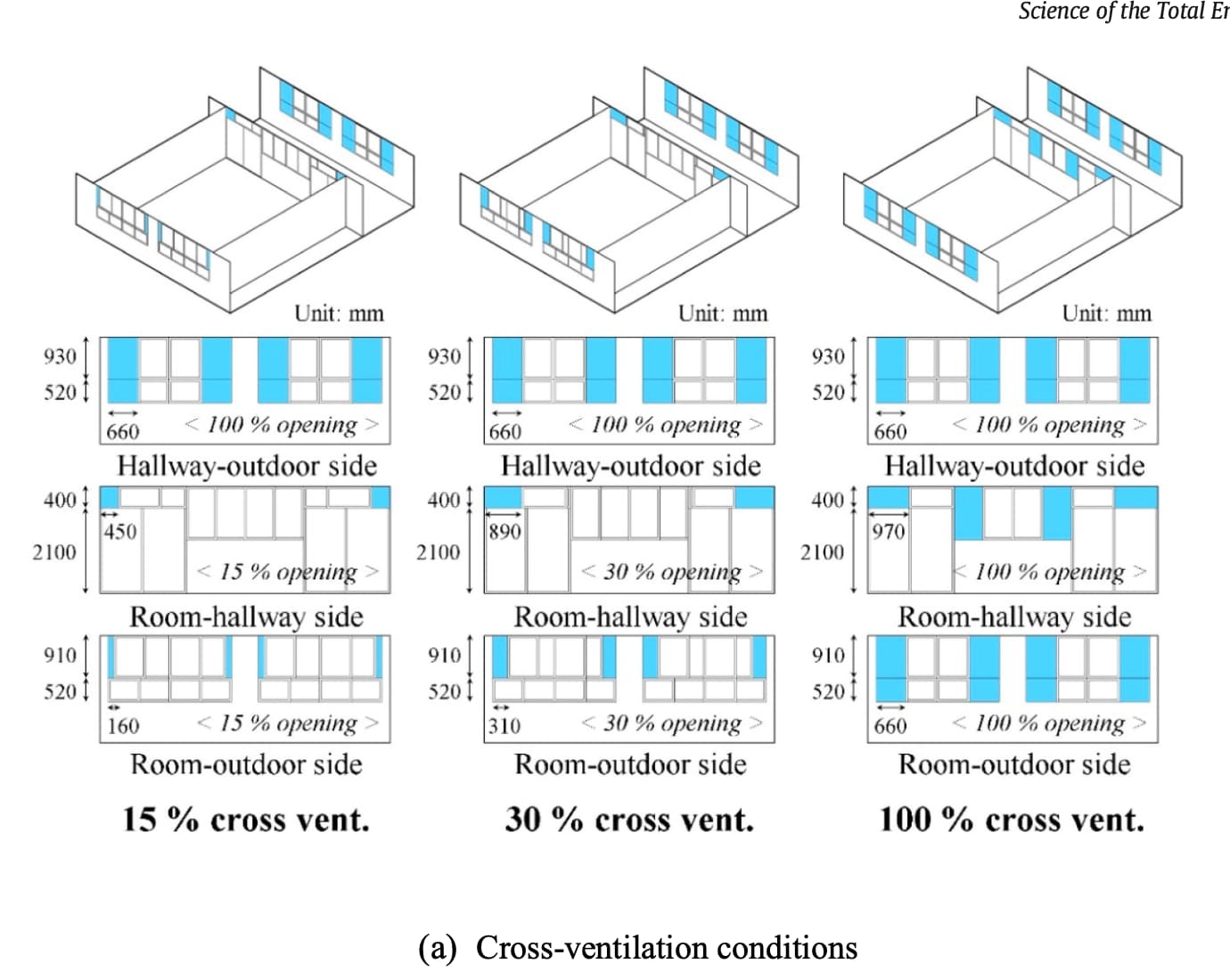
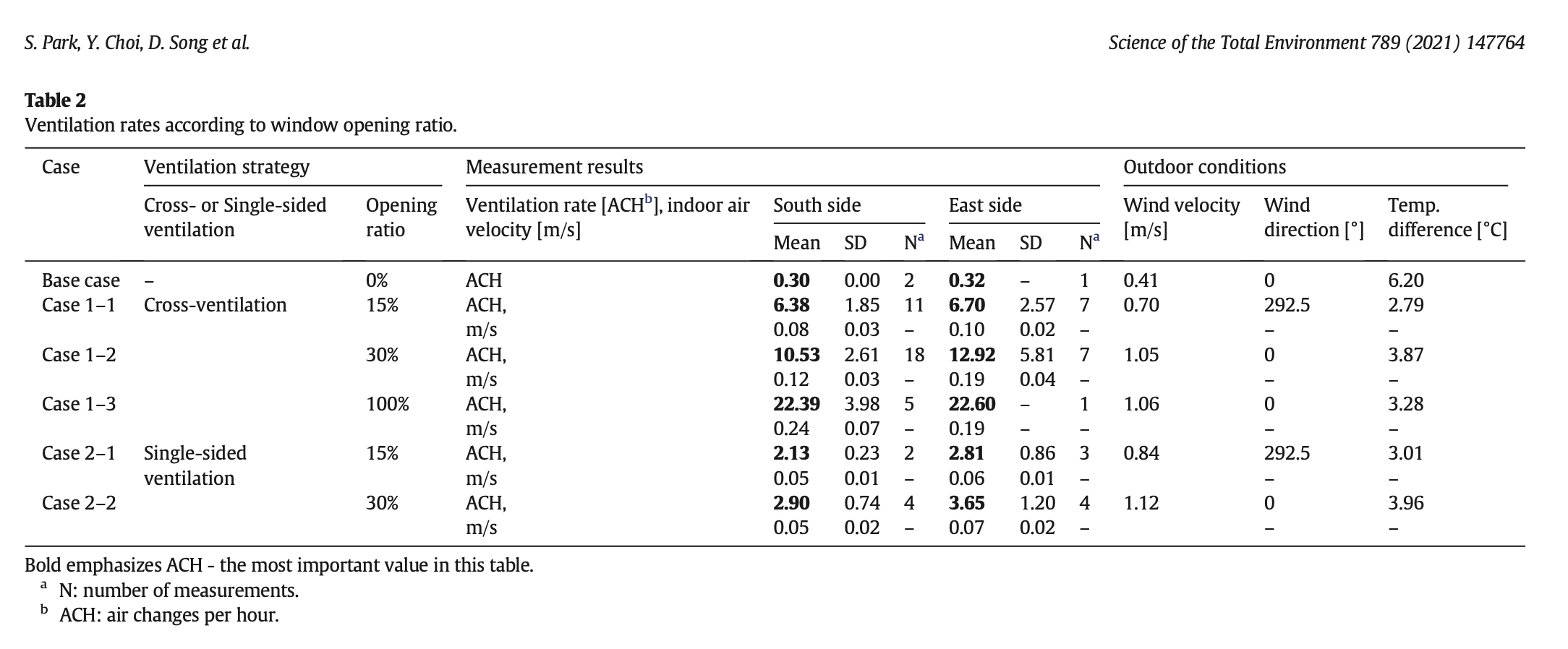
I would have to do more research but a paper i found of a real life study found that for cross ventialtion the ACH for always open is more towards 20 ACH.
What do you think is an ACH rate of 77 even possible in the real world ?
Best regards,
Nick
Error file
Program Version,EnergyPlus, Version 23.2.0-7636e6b3e9, YMD=2026.02.13 18:24,
** Warning ** ManageSizing: For a zone sizing run, there must be at least 1 Sizing:Zone input object. SimulationControl Zone Sizing option ignored.
** Warning ** ManageSizing: For a plant sizing run, there must be at least 1 Sizing:Plant object input. SimulationControl Plant Sizing option ignored.
** Warning ** Site:GroundTemperature:BuildingSurface: Some values fall outside the range of 15-25C.
** ~~~ ** These values may be inappropriate. Please consult the Input Output Reference for more details.
** Warning ** Weather file location will be used rather than entered (IDF) Location object.
** ~~~ ** …Location object=SITE 1
** ~~~ ** …Weather File Location=Lagos-Muhammed.Intl.AP LA NGA SRC-TMYx WMO#=652010
** ~~~ ** …due to location differences, Latitude difference=[6.58] degrees, Longitude difference=[3.32] degrees.
** ~~~ ** …Time Zone difference=[1.0] hour(s), Elevation difference=[4110.00] percent, [41.10] meters.
** Warning ** ProcessScheduleInput: Schedule:Constant=“ALWAYS ON DISCRETE”, Blank Schedule Type Limits Name input – will not be validated.
** Warning ** ProcessScheduleInput: Schedule:Constant=“ALWAYS OFF DISCRETE”, Blank Schedule Type Limits Name input – will not be validated.
** Warning ** ProcessScheduleInput: Schedule:Constant=“ALWAYS ON CONTINUOUS”, Blank Schedule Type Limits Name input – will not be validated.
** Warning ** ProcessScheduleInput: Schedule:Constant=“OUTDOOR CO2 LEVEL”, Blank Schedule Type Limits Name input – will not be validated.
** Warning ** CheckUsedConstructions: There are 15 nominally unused constructions in input.
** ~~~ ** For explicit details on each unused construction, use Output:Diagnostics,DisplayExtraWarnings;
** Warning ** GetPollutionFactorInput: Requested reporting for Carbon Equivalent Pollution, but insufficient information is entered.
** ~~~ ** Both “FuelFactors” and “EnvironmentalImpactFactors” must be entered or the displayed carbon pollution will all be zero.
************* Testing Individual Branch Integrity
************* All Branches passed integrity testing
************* Testing Individual Supply Air Path Integrity
************* All Supply Air Paths passed integrity testing
************* Testing Individual Return Air Path Integrity
************* All Return Air Paths passed integrity testing
************* No node connection errors were found.
************* Beginning Simulation
** Warning ** The resource referenced by LifeCycleCost:UsePriceEscalation= "U.S. AVG COMMERCIAL-
************* ===== Final Error Summary =====
************* The following error categories occurred. Consider correcting or noting.
************* Nominally Unused Constructions
************* …The nominally unused constructions warning is provided to alert you to potential conditions that can cause
************* …extra time during simulation. Each construction is calculated by the algorithm indicated in the HeatBalanceAlgorithm
************* …object. You may remove the constructions indicated (when you use the DisplayExtraWarnings option).
************* EnergyPlus Warmup Error Summary. During Warmup: 0 Warning; 0 Severe Errors.
************* EnergyPlus Sizing Error Summary. During Sizing: 2 Warning; 0 Severe Errors.
************* EnergyPlus Completed Successfully-- 16 Warning; 0 Severe Errors; Elapsed Time=00hr 00min 41.93sec
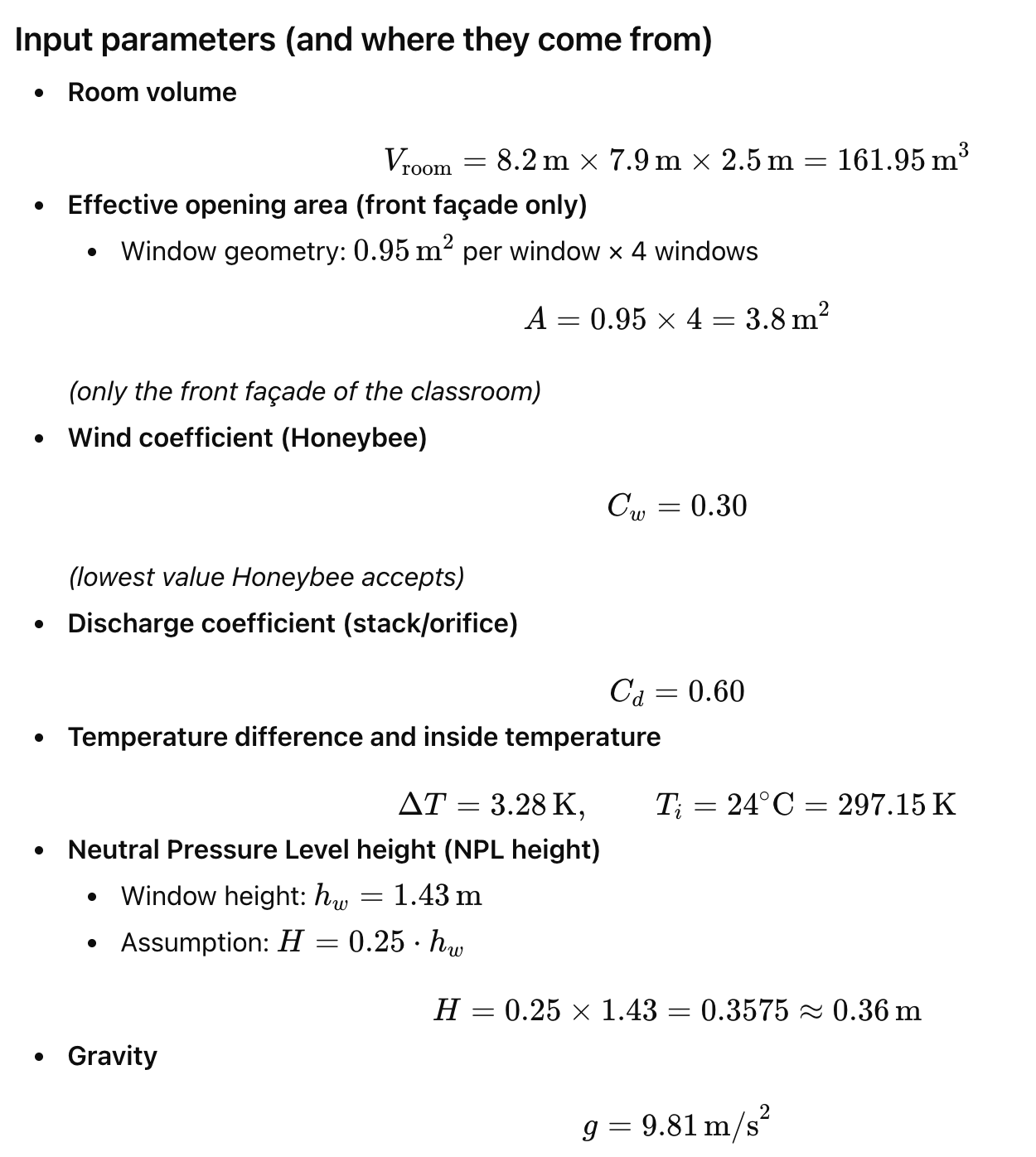
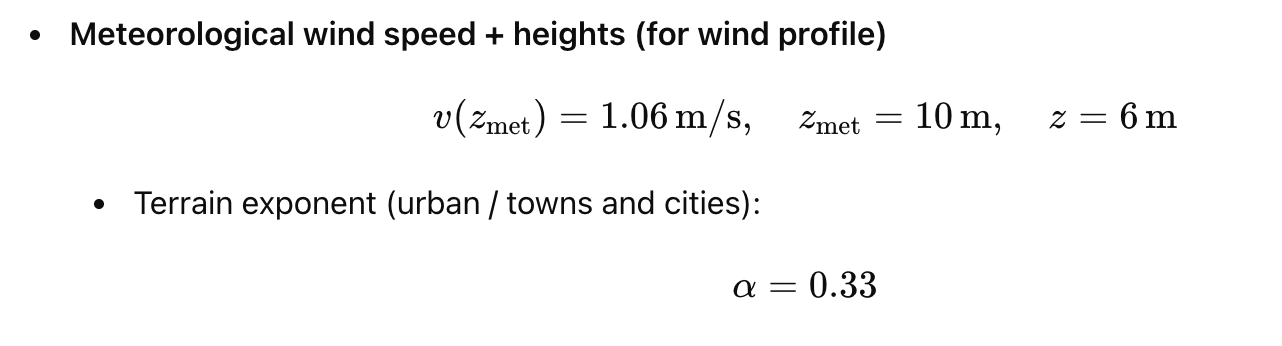
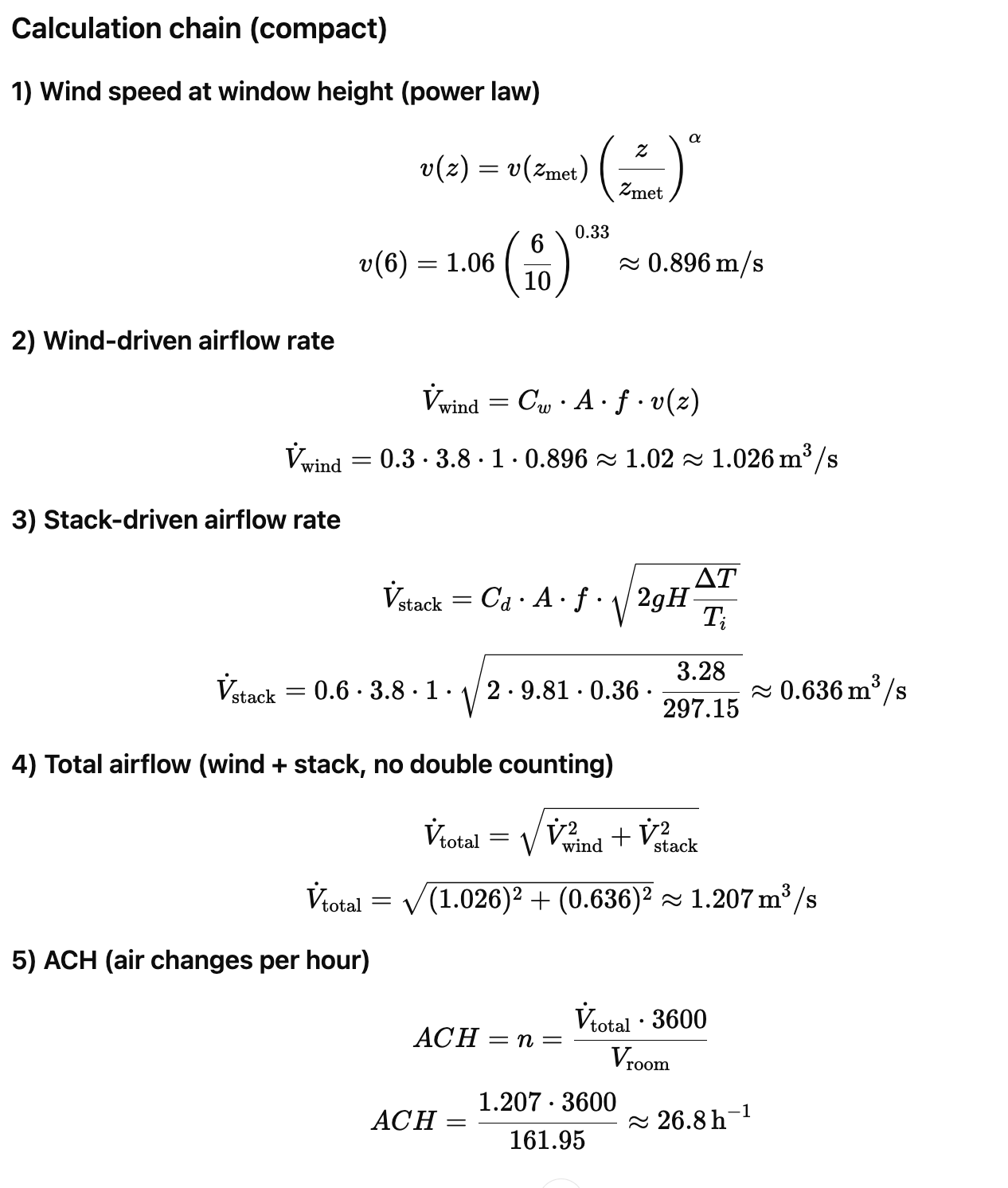
So when i use the equations form energy plus and only one facade side for the windows i get a ACH of 26.8
The real world rate that was measured in the paper is an ACH rate of 22.4 ACH
So this is quite close but i also only accounted for one facade even though it is cross ventilation.
When you use the actual window opening so instead A= 3.8m2 A= 7.6 m2.
The ACH rate is 53.5 ACH
So what im trying to say is that im not so sure of the formulars are a good aprroximation for the natural ventialion simulation since the values are quite far apart. Does anyone have more experince with this and can help me out ?
I also tried with the AFN Komponet and for small window sizes it works accurate for bigger windows i get high values that seem unrealistic.