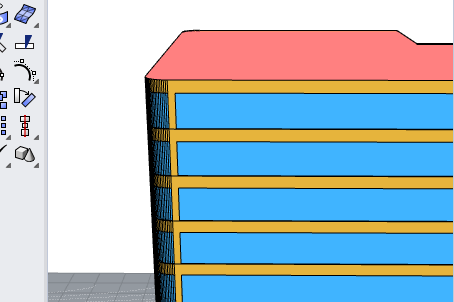
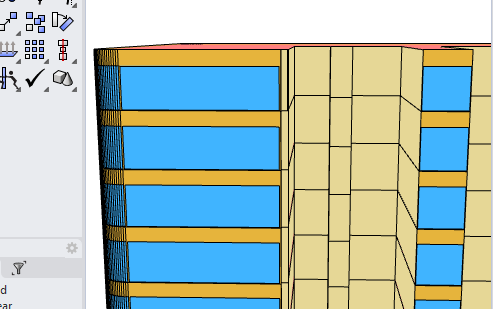
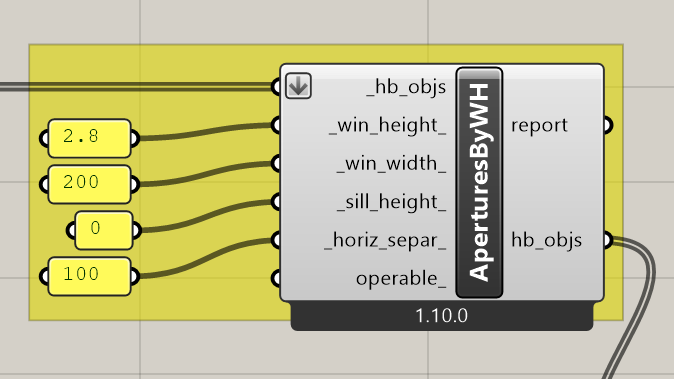
I have run into an issue using AperturesByWH. Even though I have set the window width to longer than the wall surface (so as to have one window across the full length of the wall), I am getting little pieces of opaque wall at the end of the wall surface. This appears to be proportional to the overall width of the wall.
Has anyone figured out a fix for this? I’m trying to get away from having to model individual glazing surfaces or use guide surfaces. When i do model apertures individually, Normally i can just offset the aperture surface so its 0.99 of the parent surface so im not sure why this component would leave such a big gap
As per EnergyPlus convention, subsurfaces like windows need to be inside their parent surfaces. You could probably just do what you were doing before and set it to a value just slightly lower than the wall width.
Hi Sarith, thanks for your reply. The beauty of being able to set the width wider than the longest wall is that individual walls do not need inputs iso it is very fast to model a curtain wall with a specific spandrel and head height which is otherwise quite time consuming. @chris is it possible for an option to allow modelling closer to the width of the parent surface, 0.99 or 0.995 for example?
Thanks for pointing this out, @Nicholaskerr and for reminding me of my old code, @sarith .
I made a change such that the offset is now by the model tolerance rather than a fraction of the parent face’s width or height:
This should give you what you were expecting for this case, @Nicholaskerr. Just be careful setting up your window construction with frames if they go all of the edge. E+ will give you a fatal error if the sum of the window area + the offset frame exceeds the parent Face’s area.
The change should be available with the LB Versioner in an hour or so.