Hi,
I have been working with the “HB Peak Loads” component and noticed a few things that go against my understanding of how the component works and general questions. The three major items are:
- What calculation method does this component use to produce the peak loads?
- There are two accepted methods of calculating heat loads in accordance with ASHREA Fundamentals 2017. These being Heat Balance Method (Iterates in time steps over the day calculating the loads based of heat balance equations) and Radiant Time Series (Utilises table coefficients to multiply against the loads before summing them all together).
- From my research it appears that HoneyBee relies on Energy Plus’s method of calculation which uses the Heat Balance Method of calculating heat loads .
- This seemed consistent with the results, however, I noticed when I toggled the Monthly_cool_ parameter to “LB EPW to DDY” the results seemed to resemble a normal distribution which more closely aligns with the RTS method.
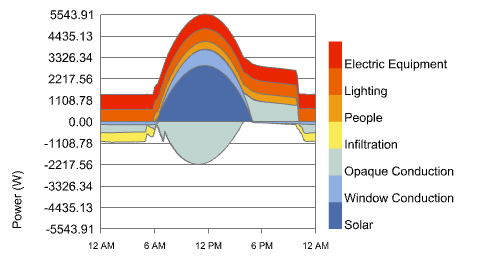
- How are gains and profiles incorporated into this calculation? What control over this is available?
- I, upon analysing the outputs have compared my set gain profiles with the outputs of the “HB Peak Loads”. It appears that the set profiles are note reflected with the output being consistent across the entire day. (Cannot attach a file to show this as I am a “new user”)
- By inspecting this it looks as though the values are being “saturated” similarly to one of the options IES provides where it is set to 100% at all times. This isn’t a huge issue in itself but depending on the situation can impact the heat loads.
- How are the solar gain determined by this component?
- The calculation of solar gains is dependent on the software. IES utilises sun cast to get accurate data where as others simply take the glazing area insulative value and calculate it depending on the orientation.
- I am comparing against IES and noticed a large disparity between them. I am aware IES definition of solar gains may diverge from Energy Plus by including window conduction but am struggling to find sources to support this.
Thanks in advance!