Honeybee Using 2 different Construction Sets

Hello!

I am building an energy model that has a vertical extension. Therefore, it has different construction layers in the vertical extension. (different floor layers, exterior wall, etc.) Honeybee doesn’t understand when I have two different construction sets as it says the floor of the vertical extension is not the reverse order of the lower floor’s ceiling. Does anybody know if I can have several floor types? How can I force Honeybee to read two different construction set for different floors. (Also, the basement has different walls and floor layers, but I’ve been neglecting it so far…)

I have a simple sketch of the floors I’m simulating.
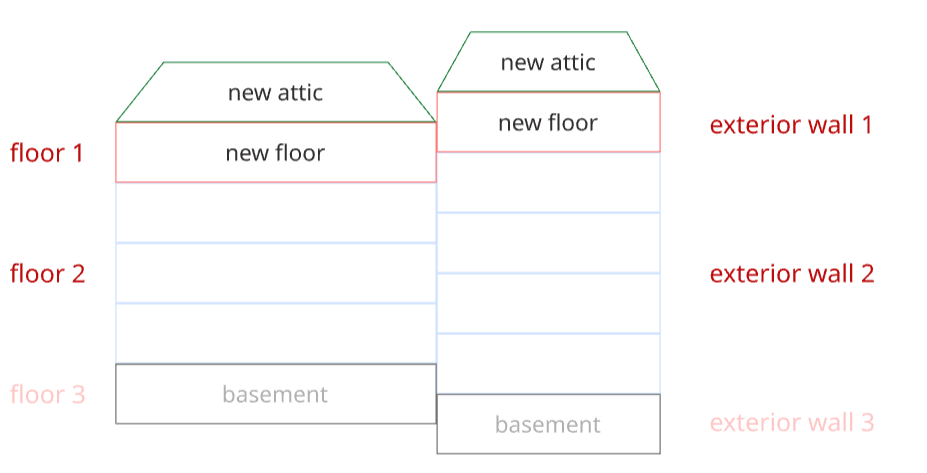
Thanks a lot!

Hi @asezel ,

I’m not sure I fully understand the entire question, but for your query of:

… can [I] have several floor types?

no, a single construction-set can only have a single construction type for each item. You would need to setup a new construction-set with your new floor type, then assign that new construction-set to the extension’s HB-Rooms.

You just need to build the construction-sets, and apply them to different groups of rooms:

example.gh (46.8 KB)

Alternatively: you can use the HB Properties by Guide Surface component after the rooms have been made to set the construction type for specific faces. But this requires drawing ‘guide-surface’ geometry in the Rhino scene.

If you would rather have direct ‘select-a-surface-and-set-construction’ control in Rhino, you might want to check out the Pollination Rhino Plugin.

best of luck with it,
@edpmay