Hi everyone,
I would like to know how to correctly model an open/semi-outdoor area in Honeybee/Ladybug Tools.
I am currently modeling a school building, and part of the ground floor has an open garage/covered access area, as shown in the image attached. This area is not a conditioned indoor space; it is basically open to the exterior through the garage entrances.
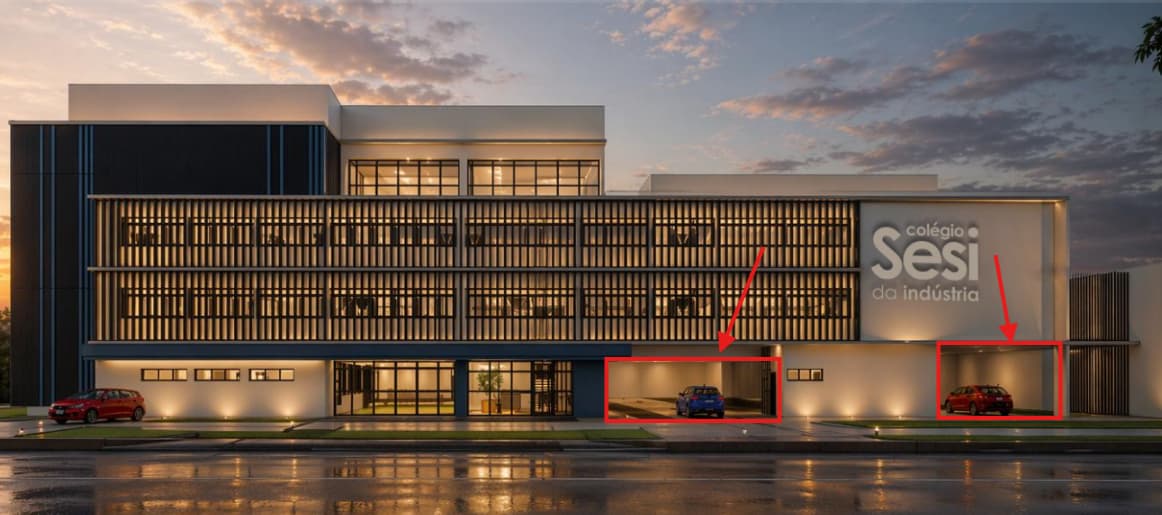
In a previous discussion, I saw a suggestion to model this kind of open area as context shade geometry instead of creating Honeybee Rooms with walls or Air Boundaries. I initially tried using walls/Air Boundaries, but the results did not seem appropriate for this situation.
My main doubt is:
If I model this open garage/covered area only as context shade, what happens to the floor of the room above it? In this case, the ceiling of the garage is also the floor of the occupied space above. Would Honeybee/EnergyPlus treat that floor as an exterior-exposed floor? Is that correct for this kind of situation, since the garage below is open to outdoor air?
I also have a similar question for other semi-outdoor areas in the project, such as covered circulation or student common areas. I would like to evaluate the air temperature or thermal condition of these semi-open spaces, but since they are not fully enclosed rooms, I am not sure if it is appropriate to use PMV comfort analysis for them.
For these semi-open areas, would it be better to use UTCI instead of PMV to evaluate thermal comfort? Or is there another recommended workflow in Ladybug Tools for analyzing the temperature and comfort of covered/semi-outdoor spaces?
So I would like to ask:
- Is the recommended workflow still to model this open garage area only as shade/context geometry?
- Should the occupied room above have its floor boundary condition set as Outdoors, since the garage below is open?
- Or is there a better way to represent this kind of semi-outdoor/covered area in current versions of Ladybug Tools?
- Would it make sense to create an unconditioned Honeybee Room for the garage, or would that create more problems because of the large openings?
- For semi-outdoor areas such as covered common spaces or open circulation areas, should I avoid PMV and use UTCI instead?
- If I want to understand the approximate temperature/thermal condition of these semi-open spaces, what would be the most appropriate analysis method in Ladybug Tools?
I am attaching the facade image as a reference. The open garage entrances are on the ground floor.
Any recommendation on the best current modeling approach would be very helpful.
Thanks!