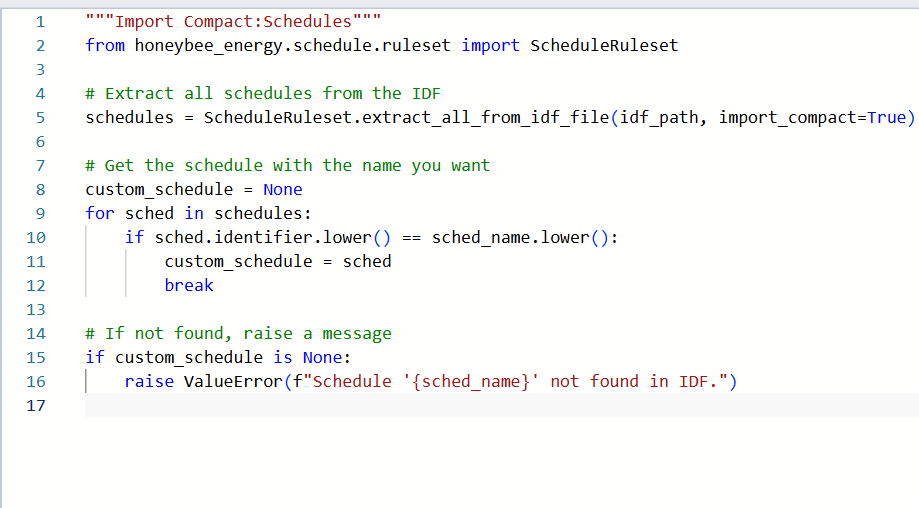
Hi all. I am trying to import custom schedules and have found some old topics that went down this, but I am still having trouble. I have limited programing knowledge but have written a python script to import Schedule:Compact objects from an idf.
This issue that I am having is I am now trying to make a custom dictionary for this file that the schedules can be drawn from. I am not sure how to go about creating this. Also, when I deconstruct schedules from this there appears to be no information transferred other than the name. Is this caused by an issue with the script? Any assistance would be appreciated.
Also, is there anyway to take constructions from an existing .idf, and turn that into a construction set simply or would that be too complicated to do with a script?
Sorry for such a late reply here. Before I answer your specific questions about your script, I wanted to make sure you are aware that you can drop IDF files with schedules in them into the following folder:
… and the next time that you open Grasshopper, those schedules will be loaded into your library such that you can assign them to Honeybee objects using only the IDF name. The same thing goes for IDF files with materials/constructions. You will just add them to the following folder:
Now, to answer your questions about how to script with the LBT core libraries in Grasshopper, I would first need to know which of the 3 different Python components you are using from Rhino 8? Is it the cPYthon 3 component, the IronPython 2 component or the older GHPython component (which still works in Rhino 7 while the other two only work in Rhino 8)?
For best compatibility with the other LBT components, you should use the GHPython component, which you can access by double-clicking the Grasshopper canvas and typing #GHPython. All of the LBT components are of this type of python component so, if you want the schedules coming out of your custom component to be parse-able with the other LBT components, then use this one.
Otherwise, I don’t see anything wrong with your script. There is an OpaqueConstruction.extract_all_from_idf_file() method for constructions that works a lot like the one for schedules.