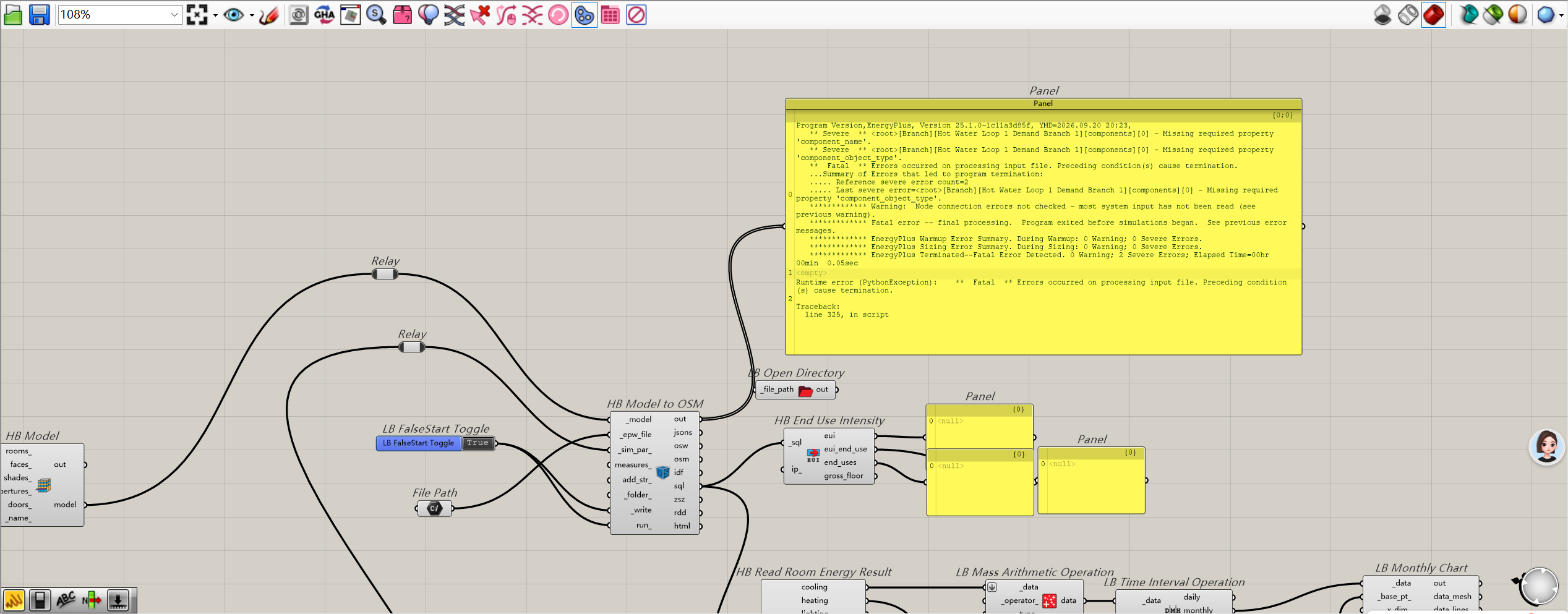
Ironbug component does not turn red with invalid empty plant branch, fatal EnergyPlus error "Missing required property 'component_name'"

Hello everyone, hope you’re doing well.

I’m building HVAC systems with Ironbug + Honeybee 1.8.0 in Grasshopper. Problem 1: Ironbug components do NOT show red/orange warning colour on canvas even when the generated plant branch is empty and invalid. The component remains grey and runs successfully in GH without any preview warning. The fatal error only pops out after exporting IDF and running EnergyPlus simulation. Problem 2: The empty plant branch causes EnergyPlus fatal error: Missing required property 'component_name'. The simulation terminates immediately. Model setup: 18 guest room thermal zones, using Ironbug IB ThermalZone, IB ZoneEquipmentGroup, NoAirLoop, HB Detailed HVAC and HVACSystem with plant loops.

Expected Behaviour

I expect Ironbug to validate the branch inside Grasshopper. If a plant branch has no equipment attached, the Ironbug component should turn red / orange and throw a warning inside GH canvas before I export IDF, instead of silently generating invalid IDF file.

Actual Behaviour

  1. All Ironbug components stay grey with no warning colour on GH canvas, no runtime error inside Grasshopper.

  2. IDF exports successfully.

  3. EnergyPlus crashes at runtime, fatal error log:

  4. Missing required property ‘component_name’

    This error is triggered by empty plant branch (no water components added into branch).

    Environment

    • Rhino 7 / 8

    • Grasshopper

    • LBT: Honeybee 1.8.0 + Ironbug

    • OS: Windows

    • GH display scaling: 150% (tested if scaling affect warning rendering)

    Screenshot description

    Attached GH canvas screenshot: IB ThermalZone connected with IB ZoneEquipmentGroup → NoAirLoop → HB Detailed HVAC → HVACSystem with PlantLoops. Yellow panel shows the generated zone IDF snippet, Thermostat Name field is empty and Use Ideal Air Loads = No.

    Additional questions

    1. Is it by design that Ironbug skips branch validation inside Grasshopper and only let EnergyPlus catch empty branch errors?

    2. Is there a setting to turn on pre-validation inside Ironbug so invalid branches trigger canvas warnings?

    3. For my 18 guest room zones, if I only need peak heating/cooling load calculation, is using native Honeybee IdealAirLoad a more stable alternative than Ironbug plant loop setup?

      20260920(客房).gh (643.4 KB)

      场地模型建模正式9.19.3dm (3.6 MB)

Hello everyone, hope you’re doing well.

I’m building HVAC systems with Ironbug + Honeybee 1.8.0 in Grasshopper. Problem 1: Ironbug components do NOT show red/orange warning colour on canvas even when the generated plant branch is empty and invalid. The component remains grey and runs successfully in GH without any preview warning. The fatal error only pops out after exporting IDF and running EnergyPlus simulation. Problem 2: The empty plant branch causes EnergyPlus fatal error: Missing required property 'component_name'. The simulation terminates immediately. Model setup: 18 guest room thermal zones, using Ironbug IB ThermalZone, IB ZoneEquipmentGroup, NoAirLoop, HB Detailed HVAC and HVACSystem with plant loops.

Expected Behaviour

I expect Ironbug to validate the branch inside Grasshopper. If a plant branch has no equipment attached, the Ironbug component should turn red / orange and throw a warning inside GH canvas before I export IDF, instead of silently generating invalid IDF file.

Actual Behaviour

  1. All Ironbug components stay grey with no warning colour on GH canvas, no runtime error inside Grasshopper.

  2. IDF exports successfully.

  3. EnergyPlus crashes at runtime, fatal error log:

  4. Missing required property ‘component_name’

    This error is triggered by empty plant branch (no water components added into branch).

    Environment

    • Rhino 7 / 8

    • Grasshopper

    • LBT: Honeybee 1.8.0 + Ironbug

    • OS: Windows

    • GH display scaling: 150% (tested if scaling affect warning rendering)

    Screenshot description

    Attached GH canvas screenshot: IB ThermalZone connected with IB ZoneEquipmentGroup → NoAirLoop → HB Detailed HVAC → HVACSystem with PlantLoops. Yellow panel shows the generated zone IDF snippet, Thermostat Name field is empty and Use Ideal Air Loads = No.

    Additional questions

    1. Is it by design that Ironbug skips branch validation inside Grasshopper and only let EnergyPlus catch empty branch errors?

    2. Is there a setting to turn on pre-validation inside Ironbug so invalid branches trigger canvas warnings?

    3. For my 18 guest room zones, if I only need peak heating/cooling load calculation, is using native Honeybee IdealAirLoad a more stable alternative than Ironbug plant loop setup?

      20260920(客房).gh (643.4 KB)

      场地模型建模正式9.19.3dm (3.6 MB)

@ZhengrongTao I wonder if you could share some insights on this Ironbug behaviour.
Thank you very much for your help and insights!