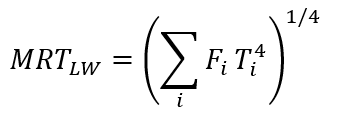
I have a question regarding the long-wave MRT calculation in the current Ladybug Tools (v1.9) workflow.
From my understanding of the current implementation:
LB Human to Sky Relation calculates sky exposure (sky_exposure) and fraction of body exposed to direct sun (fract_body_exp).
LB Outdoor Solar MRT requires a single _surface_temp input together with solar and infrared radiation data.
The workflow does not appear to explicitly calculate view factors between the pedestrian and individual surrounding surfaces (e.g., walls, roofs, and ground).
Therefore, I am wondering whether the current SolarCal workflow should be considered a simplified MRT approach rather than a full long-wave radiative exchange model based on:
where (F_i) represents the view factor between the pedestrian and each surrounding surface, and (T_i) represents the corresponding surface temperature.
Is this interpretation correct?
If so, for users interested in a more physically rigorous long-wave MRT calculation that explicitly accounts for:
ground surface temperatures,
wall surface temperatures,
roof surface temperatures,
view factors between pedestrians and surrounding surfaces,
is there a recommended workflow within the current LBT 1.9 ecosystem?
The previous Microclimate Map / Outdoor Comfort Recipe workflow appears to have been removed from the newer versions, so I am curious whether there is currently a recommended approach for performing rigorous urban MRT calculations.
Currently, the MRT calculation method in Ladybug is simplified (typically assuming that the temperature of all surfaces except the sky equals the air temperature), because solving for the temperature of all surfaces (buildings, vegetation, etc.) is almost impossible. If you wish to achieve a relatively more accurate outdoor MRT calculation, you can try using the plugin I developed, NeosEnviSim (download link: https://www.food4rhino.com/en/app/neosenvisim, source code: GitHub - WahfeiWong/NeosEnviSim: Tools for building environment simulation with Grasshopper. · GitHub , documentation for MRT calculation: NeosEnviSim/Document at NeosEnviSim-Dev · WahfeiWong/NeosEnviSim · GitHub ). This plugin solves for ground surface temperature and sky temperature, while the temperatures of other obstacle surfaces (e.g., buildings, vegetation) can be manually input. For example, you can use Energy Plus to solve building surface temperatures, and thereby calculate a relatively more accurate outdoor MRT. The plugin also has many other features. If you find it useful, please recommend it to your friends.
Thank you very much for your detailed response and for sharing your work. Your explanation has been incredibly helpful to me and has given me a much clearer understanding of the limitations of the MRT calculation in Ladybug, as well as the possible ways to improve its accuracy.
I really appreciate you taking the time to introduce NeoEnviSim and provide the related resources and documentation. This information is extremely valuable for my research.
I will try the plugin as soon as possible and explore the workflow you suggested. Once I have tested it, I will get back to you with my results and feedback.
Thank you again for your generous help and support.
Have you tried using the UTCI Comfort Map component? It can output long-wave MRT through env_conds outputs and it accounts for the ground and building surface temperatures if they have been modelled as thermal zones. See more info here: UTCI Comfort Map | HB-Energy Primer