It seems that this change has not yet been implemented on Windows.I still experienced situations where the connection took longer than one hour to establish, sometimes even much longer.
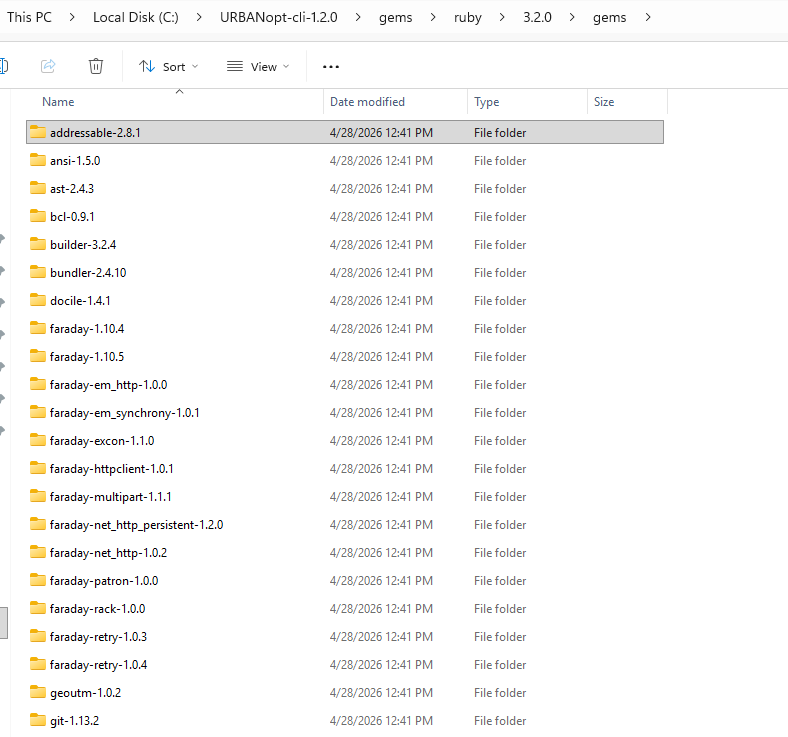
The change should be implemented at this point as evidenced by all of the gems that you see included in the URBANopt installation under this folder:
C:\URBANopt-cli-1.2.0\gems\ruby\3.2.0\gems
But I’ll admit there is still one Ruby gem out of the ~1GB of the other gems that downloads when you create a new URBANopt project folder. I left it there mainly so that we could get a sense of the usage of the URBANopt workflows by means of the downloads of the gem. These usage numbers have been pretty important when applying for URBANopt project funding so I did not want to remove it if I did not have to.
But let’s first confirm that this is actually the issue. I put together a GEMFILE here that excludes that one gem and put it in a zip file: urbanopt_Gemfile.zip (942 Bytes)
If you can unzip it and replace the following file on your system with the one in the zip folder:
… then try restarting Rhino and running the URBANopt workflows again.
If it all runs really quickly this time, we will know that this one gem is the issue and I’ll see if I can give you a better workflow for disabling it. Otherwise, if it’s still taking a long time, then we know its some of the other gems that are still being downloaded and are causing the issue, in which case I’ll have to work with NREL to figure out which ones are missing.
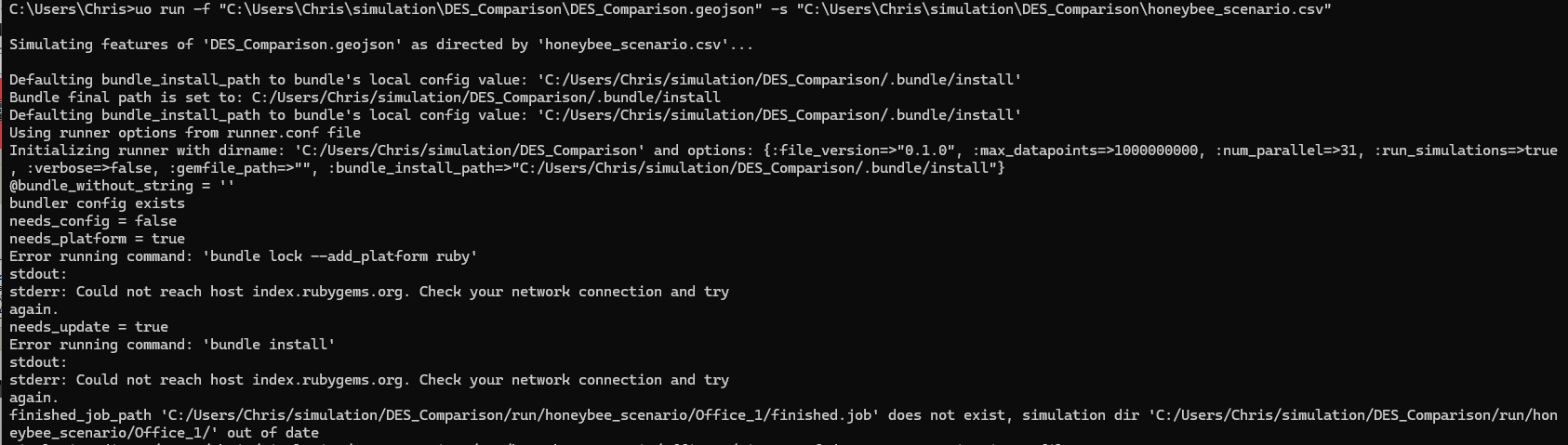
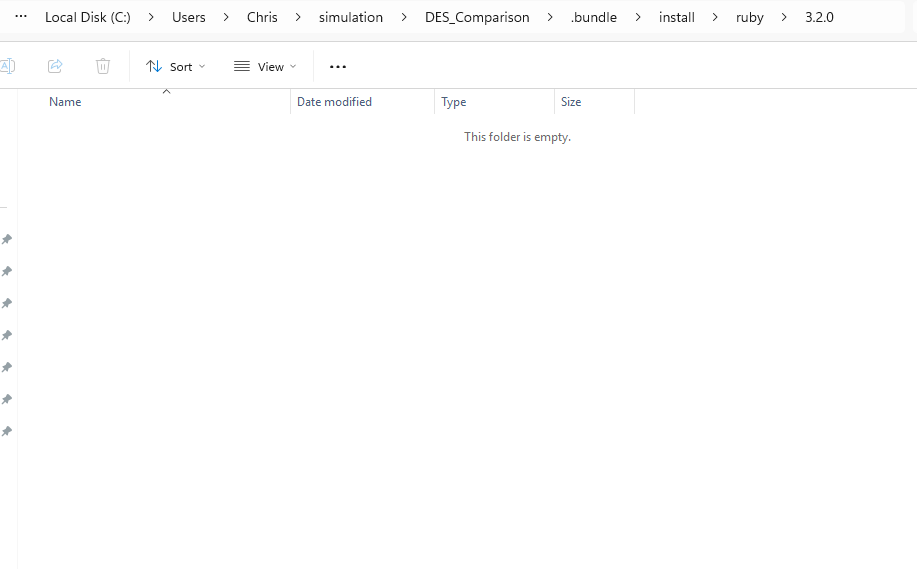
FYI, I just ran a test with trying to run URBANopt while disconnected from the internet and I got the following failure:
Error running command: 'C:/URBANopt-cli-1.2.0/OpenStudio/bin/openstudio.exe --bundle 'C:/Users/Chris/simulation/DES_Comparison/Gemfile' --bundle_path 'C:/Users/Chris/simulation/DES_Comparison/.bundle/install' run -w 'C:/Users/Chris/simulation/DES_Comparison/run/honeybee_scenario/Residential_1/in.osw' 2>&1 > "C:/Users/Chris/simulation/DES_Comparison/run/honeybee_scenario/Residential_1/in.osw.log"'
stdout: Failed to run workflow. Last Error:
  Found error in state 'OpenStudioMeasures' with message: 'Bundler::GemNotFound: Could not find gem 'addressable (= 2.8.1)' in locally installed gems.
This is odd because I can clearly see this version of the adressable gem is there in the URBANopt installation:
I only realized that this issue had been responded to several times. I conducted some quick tests.
I successfully replaced this file. When using the VPN, it will be very fast. Once I left the VPN environment, this situation occurred and caused all the operations to fail.
Defaulting bundle_install_path to bundle's local config value: 'C:/Users/Tao/simulation/Buffalo_Development_DES_Flash/.bundle/install'
Bundle final path is set to: C:/Users/Tao/simulation/Buffalo_Development_DES_Flash/.bundle/install
Defaulting bundle_install_path to bundle's local config value: 'C:/Users/Tao/simulation/Buffalo_Development_DES_Flash/.bundle/install'
Using runner options from runner.conf file
Initializing runner with dirname: 'C:/Users/Tao/simulation/Buffalo_Development_DES_Flash' and options: {:file_version=>"0.1.0", :max_datapoints=>1000000000, :num_parallel=>31, :run_simulations=>true, :verbose=>false, :gemfile_path=>"", :bundle_install_path=>"C:/Users/Tao/simulation/Buffalo_Development_DES_Flash/.bundle/install"}
@bundle_without_string = ''
bundler config exists
needs_config = false
needs_platform = true
Error running command: 'bundle lock --add_platform ruby'
stdout: Fetching source index from http://rubygems.org/


stderr: Retrying fetcher due to error (2/4): Bundler::HTTPError Could not fetch specs from http://rubygems.org/ due to underlying error <Errno::ECONNREFUSED: Failed to open TCP connection to 127.0.0.1:10808 (No connection could be made because the target machine actively refused it. - connect(2) for "127.0.0.1" port 10808) (http://rubygems.org/specs.4.8.gz)>
Retrying fetcher due to error (3/4): Bundler::HTTPError Could not fetch specs from http://rubygems.org/ due to underlying error <Errno::ECONNREFUSED: Failed to open TCP connection to 127.0.0.1:10808 (No connection could be made because the target machine actively refused it. - connect(2) for "127.0.0.1" port 10808) (http://rubygems.org/specs.4.8.gz)>
Retrying fetcher due to error (4/4): Bundler::HTTPError Could not fetch specs from http://rubygems.org/ due to underlying error <Errno::ECONNREFUSED: Failed to open TCP connection to 127.0.0.1:10808 (No connection could be made because the target machine actively refused it. - connect(2) for "127.0.0.1" port 10808) (http://rubygems.org/specs.4.8.gz)>
Could not fetch specs from http://rubygems.org/ due to underlying error
<Errno::ECONNREFUSED: Failed to open TCP connection to 127.0.0.1:10808 (No
connection could be made because the target machine actively refused it. -
connect(2) for "127.0.0.1" port 10808) (http://rubygems.org/specs.4.8.gz)>
needs_update = true
A long time ago, in the report I sent to you, there was a similar situation. Even when the network was disabled and a complete Ruby dependency file was provided, UrbanOpt would still perform some download operations, even though the dependencies were already present in the file.
I can understand this measure. However, in my area, Dragonfly has never performed well because of network restrictions. In most cases, it is impossible to quickly obtain the required dependent files using the default install method, which affects almost all users. Perhaps there are some better statistical methods that I think we could discuss.
The URBANopt dev team got back to me and helped me figure out what the problem was. It turns out that I was just missing two variables that need to be specified in order to ensure that URBANopt uses all of the gems in the local installation and does not try to download them all.
I made the change here:
… and it should now be available with the LB Versioner. I’ll also make sure that this all gets into the next version of the Pollination installers since I imagine that running the Versioner over your internet connection is also a challenge.
But, after the fix, I am able to run the URBANopt component while disconnected to the internet. Let me know if you end up testing and see a similar improvement on your end.
I firmly believe that in a normal system environment, it can almost completely skip the step of online downloading. Although there will still be some blockages due to my VPN issue, these blockages will prevent me from completing the “install” step even when there is no internet connection, just as mentioned in the above report. This might be related to my personal network configuration.
But I think this modification has been very successful because I have never experienced such a fast response speed in Dragonfly as before. UrbanOpt has almost skipped the download process that I could see before, and now there are no larger sets of dependent files accompanying the calculation files compared to the result data.
It’s time to truly share Dragonfly with the users of my channel. Thank you, along with your team and the UrbanOpt team, for your contributions.