Hi @Nathaniel, It is possible to get them for the leap_year but it is not exposed in the UI. You have to change the components in two places:
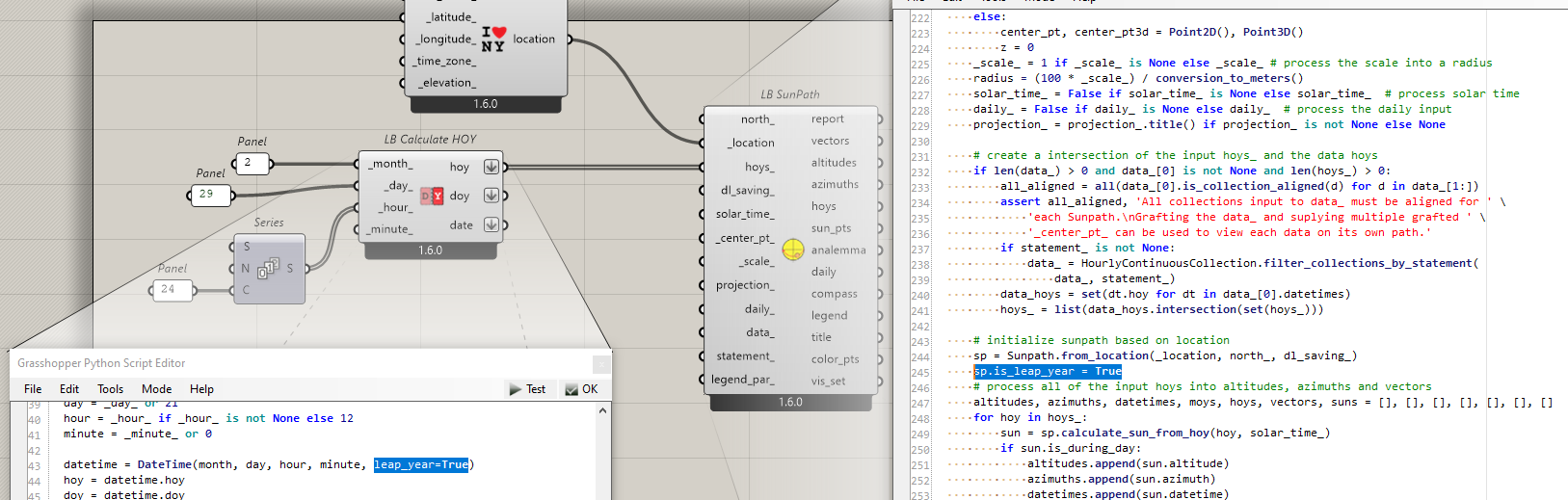
- In the
LB Calculate HOYcomponent change line 43 to calculate passleap_year=Trueto create theDateTimefor the leap year. - In the
LB SunPathcomponent, setis_leap_yeartoTrueafter creating the sunpath. Line 245 in the above screenshot.
Here is the edited GH file.
Changing the year is a bit more work since it is hard-coded in the source code. We use 2016 for leap_year and 2017 for a typical year.
You can manually edit the source code in the C:\Program Files\ladybug_tools\python\Lib\site-packages\ladybug\dt.py to change the years to the two that you are interested in comparing. Don’t forget to Restart Rhino to reload the libraries after editing them.