Unexpected temperature flattening with AirBoundaries

I’m running into some unexpected behaviour when using AirBoundaries in Honeybee models.

When setting an Air Boundary, Honeybee automatically adds ZoneMixing objects between the connected zones, assuming an air speed of 0.1 m/s.

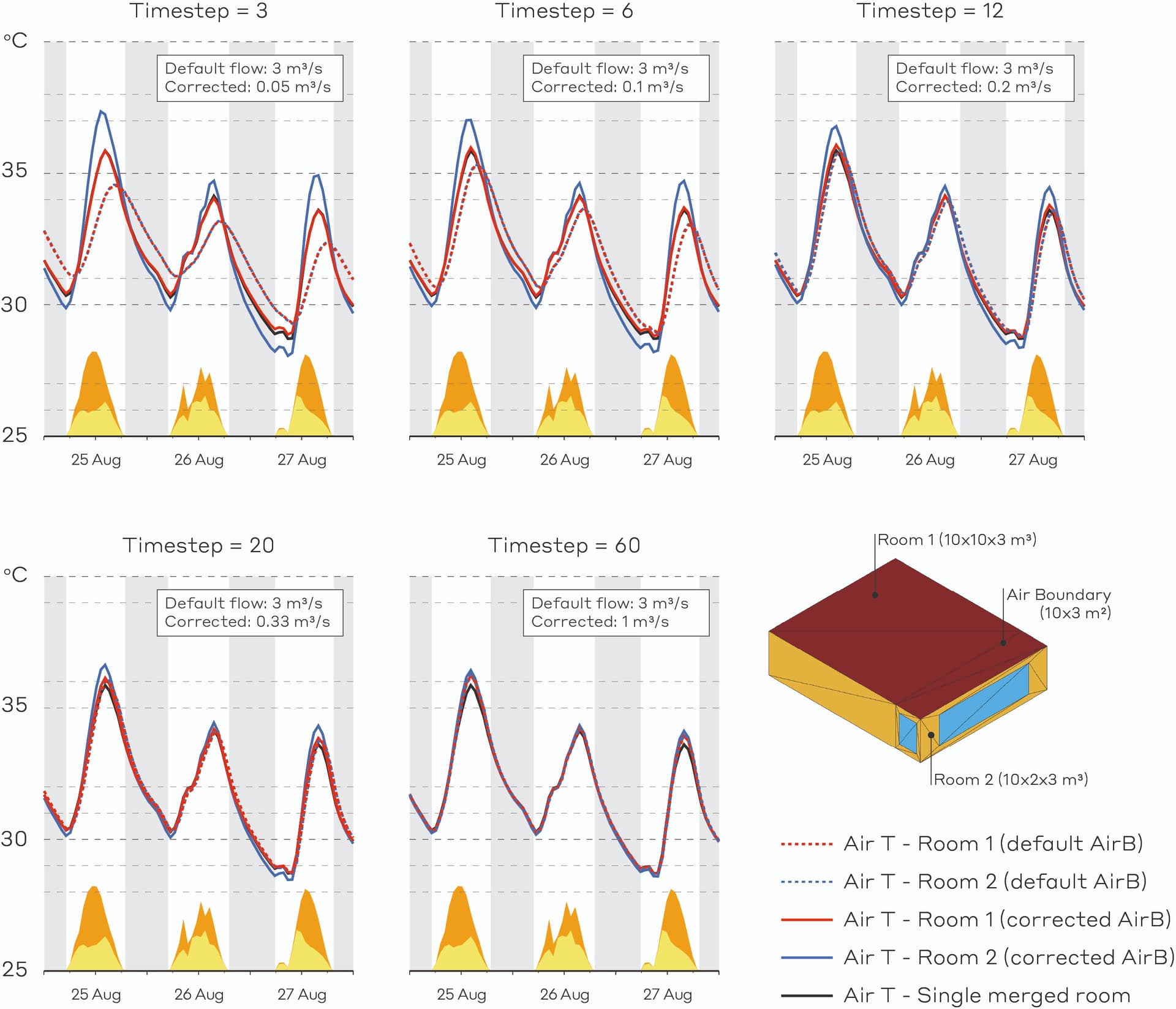
In my tests with two identical, unconditioned zones and no internal loads, I found that once the wall is set as an AirBoundary, the temperature profiles of the two rooms become somewhat flattened. If I manually remove the ZoneMixing object from the IDF, the temperature profiles start to make more sense, representing an average of the two zones’ conditions before they were connected, and the results also match those of a merged single-zone model. With zone mixing assigned, I would have expected just a faster averaging between the zones, not such a dampening of their peaks.
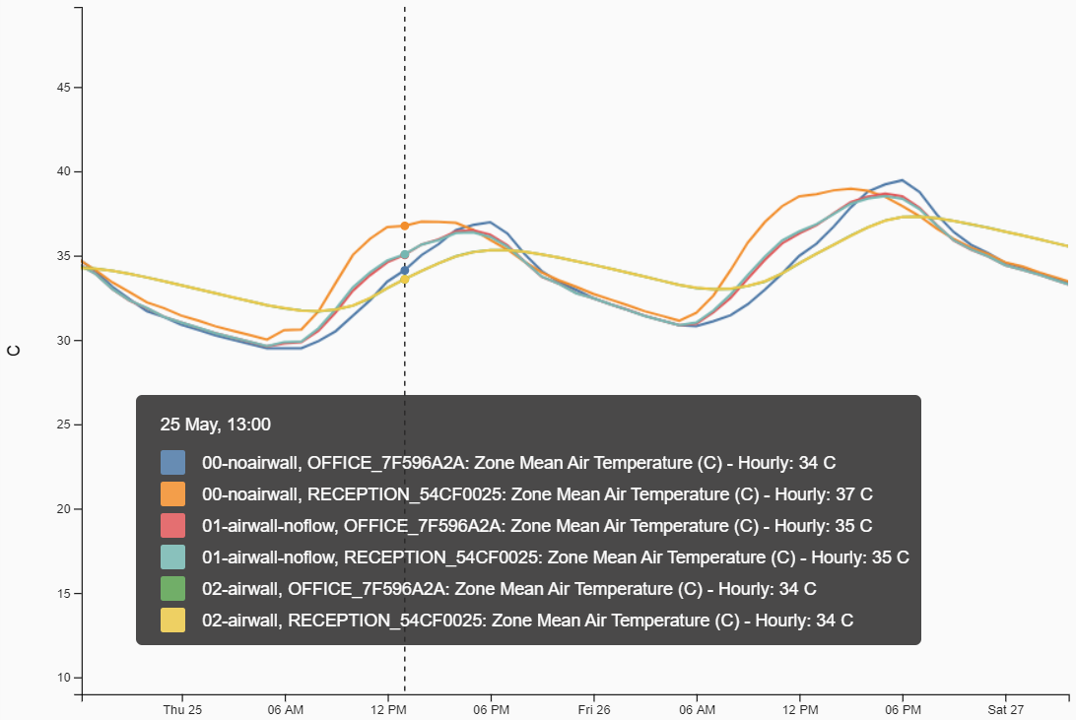
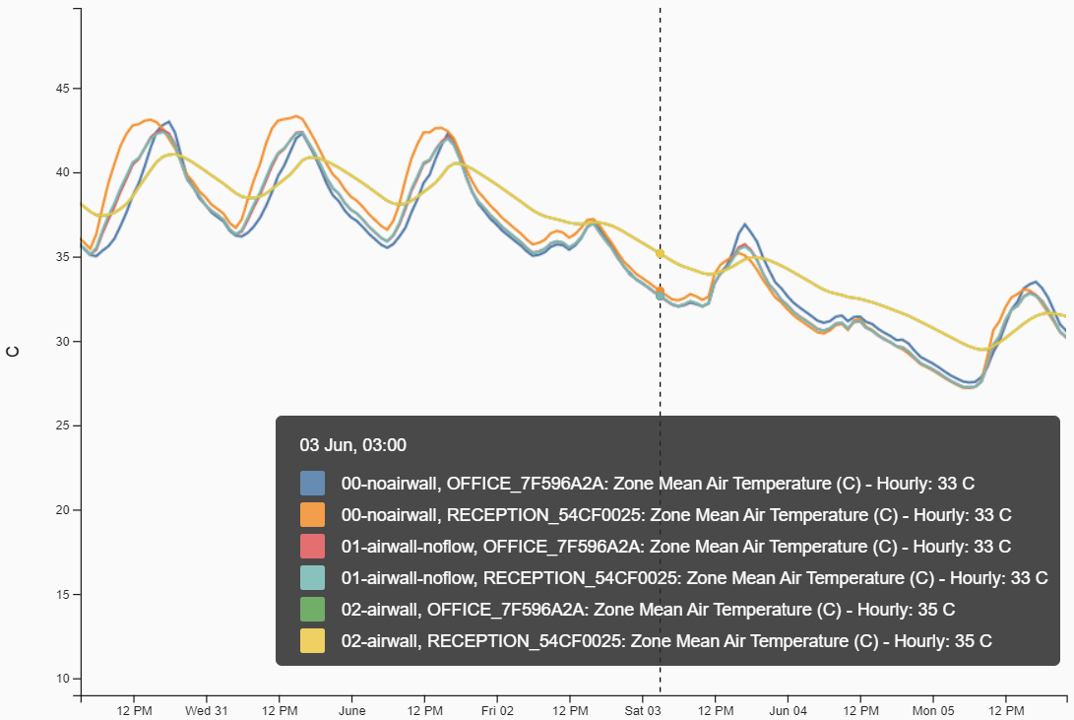
What seems like an incorrect balancing in the airflows when using ZoneMixing may actually be more of an EnergyPlus issue than a Honeybee one, that’s why I first posted about it here on Unmet Hours.
However, since AirBoundaries are commonly used in Honeybee, and since ZoneMixing is automatically assigned to them, I thought I’d ask here in case others have noticed similar results.

This also reminds me of another issue I looked into a while ago involving CO₂ dilution with ZoneMixing. There too, the exchanged air appeared to distort the mass balance showing strange results in terms of CO₂ concentration. That post is here.

Would love to hear your thoughts.

4 Likes

Hi @chris

I was hoping you could take a look at this since it feels like a pretty significant issue, as air boundaries are such a common object in Honeybee and they’re particularly important for some projects I’m working on.

Another user has already done some testing and reported it on the EnergyPlus GitHub (post), so your input there would probably carry a lot of weight too.

1 Like

HI @MatteoMerli ,

Sorry for not seeing this when you first posted and for it taking so long for me to respond.

You sparked quite a good discussion on Unmethours and congratulations on reporting an issue that has resulted in an EnergyPlus GitHub issue. I am pasting it here for reference if others want to follow whether anything comes of it:

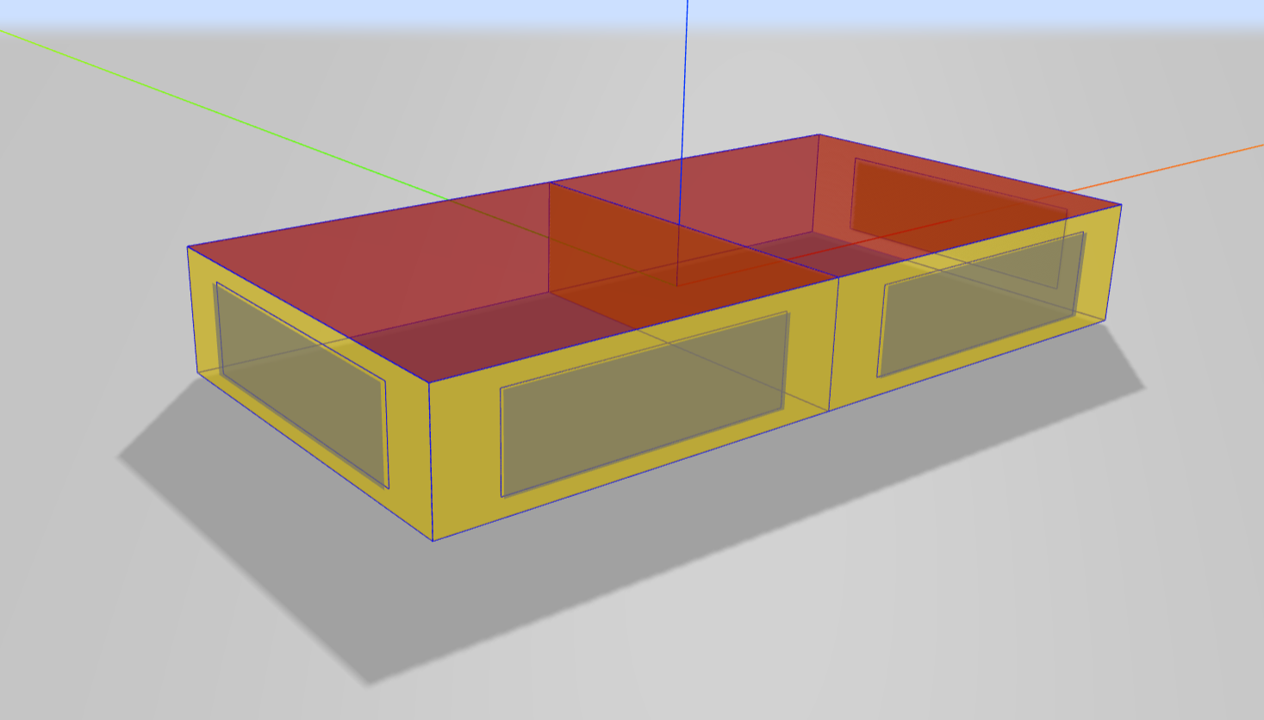
It would seem that this is a situation that can happen when you have AirBoundary adjacencies between two rooms where the surface area of the AirBoundary is particularly high in relation to the volume of the rooms (like your screenshot). This results in the room mixing over more air in a timestep than it actually has in its total volume.

I think we would all agree that E+ should at least be giving a severe warning in this case if not providing a better auto-correction for this effect. So I hope that E+ GitHub issue eventually gets a response.

Did you try the suggestion given at the bottom of the unmethours post of just increasing the timestep? You can use the _timestep_ input of the HB Simulation Parameters component to boost the timestep all of the way up to 60 and then see if you still notice the effect.

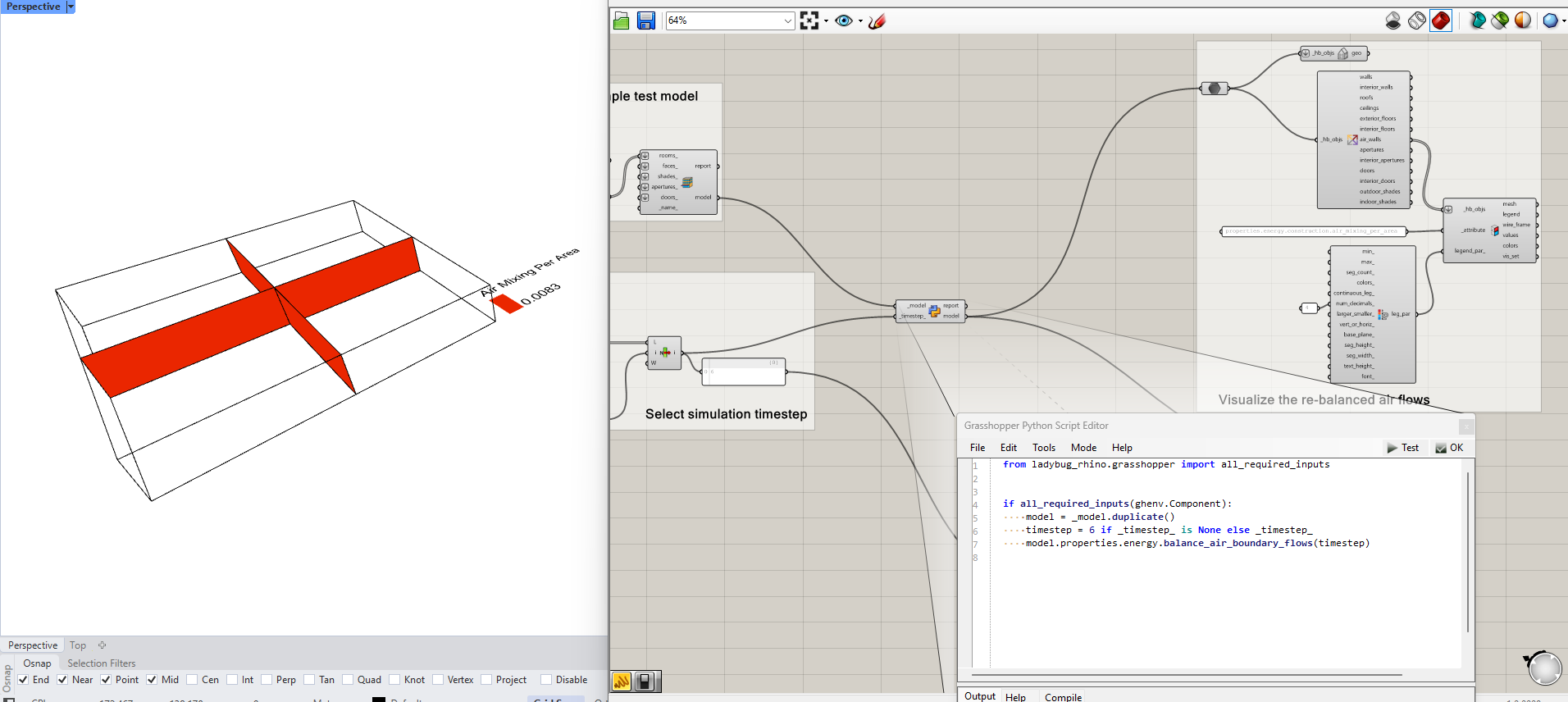
The other option for working around this is to change the air_mixing_per_area input on the AirBoundary Construction used by Honeybee. It’s not exposed on any component but you can see here in the Honeybee SDK that the AirBoundary Construction has a property for this, which you can change from the default value of 0.1 m3/s-m2. So you would just have to create that construction inside of a GHPython component and assign it to all of the faces in your Honeybee Model that have an air boundary.

I’m not quite at the point that I would change the air mixing of the default AirBoundary construction in Honeybee if only because these cases of very high AirBoundary-area-to-Zone-volume ratio tend to be rare in models of real buildings. So I wouldn’t want the real-world cases to suffer because some of the more abstract test cases we have come up with are inaccurate. Also, for those needing really accurate simulations, upping the timestep is always a good suggestion, which seems to eliminate this effect as far as we can tell. Let me know if you feel strongly otherwise, @MatteoMerli .

Hi @chris,

Thanks a lot for following up on this!

Yes, I have tested increasing the timestep to mitigate this damping effect and, depending on the model, it either makes it disappear or just reduces it, confirming that the issue is tied to how much air is exchanged within a timestep.

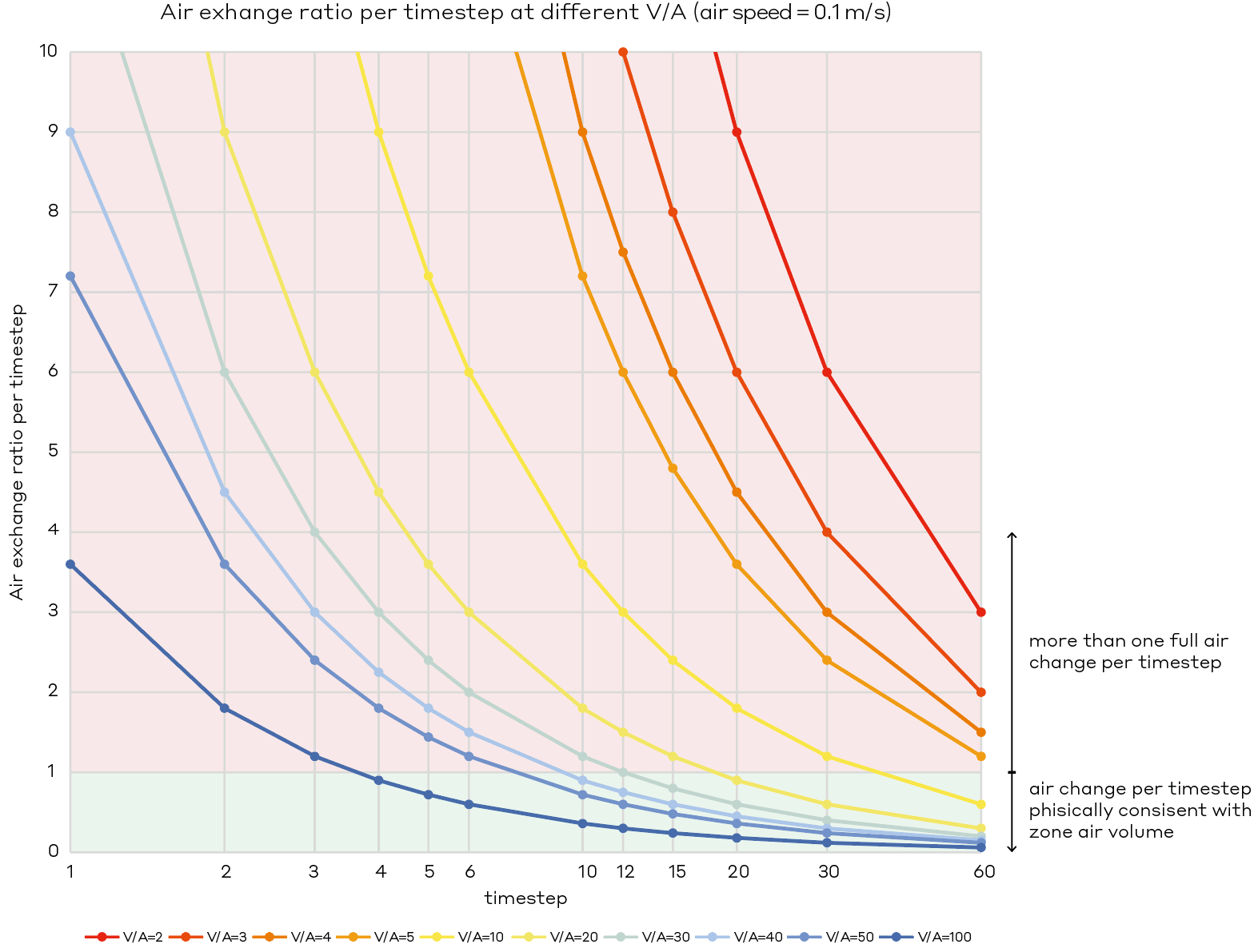
What helped me clarify things was identifying the relationship between the three involved variables: u = air speed across the AirBoundary (m/s), t = timesteps per hour, and V/A = ratio between the smaller zone’s volume and the AirBoundary surface area.

This is then used to compare the air volume exchanged during one timestep and the volume of the smaller zone. Therefore:

  • If > 1 → more than 100% of the zone air is exchanged within a single timestep → inaccurate results.
  • If < 1 → the exchanged volume is smaller than the zone’s volume → physically consistent results.

I plotted this air-mixing-flow/room-volume ratio for different V/A values and for each possible EP timestep t, using Honeybee’s default air mixing speed u = 0.1 m/s. This allows to see which combinations of V/A and timestep lead to physically consistent conditions. Note that if changing the air speed, the graph curves shift and the allowable V/A scales proportionally (half of the air speed → double the allowable V/A).

For example, from the graph, considering the default timestep of 6, all models with V/A ratio < 60 would give inaccurate results, and based on my experience they are not that uncommon. Many models I have seen have V/A ratios between 5 and 30 (whenever one of the room sides is set as an AirWall). In those cases, only timesteps > 15 would give accurate results (and for the lower ratios, even t = 60 would not be enough). These simplified and more abstract test cases were only meant to isolate issues I noticed in more complex models that I unfortunately couldn’t share in the forums.

Since I found this issue, I have tried avoiding AirBoundaries as much as possible. When I cannot avoid them, I use that equation to evaluate how much I need to increase the timestep and/or reduce the air speed (which may also be more realistic in some cases).

That said, this is currently limiting some of our studies (e.g., large atriums or big spaces that cannot be modelled as single zones), so it would be great to see it addressed by the EP developers, and in the meantime get a waning implemented to inform of this current limitation.

2 Likes

Thanks, @MatteoMerli .

In this case, why not use the workaround that I listed here?

You can make a custom GHPython component that takes the model you are about to simulate and replaces all of the air boundary constructions with ones that use no flow rate or a smaller flow rate.

Thanks @chris. Yes, that’s a valid workaround, but only up to a certain extent. For large spaces where one or more sides are modelled as AirBoundaries, the V/A ratio becomes small requiring either a very high timestep or a near-zero flow rate.

Also, increasing the timestep up to 60 in complex models significantly increases simulation time and for example limits studies that involve multiple iterations. It also limits the possibility of simulating forced air mixing between rooms at higher air speeds, that is what I was investigating before my CO2 post.

Just to clarify, I don’t think there is much that can be done on the HB side, except maybe making users aware of this limitation and inform about the tuning options. It seems to be a structural limitation in EP related to the stability of the air mass balance equation, which I consider quite serious, so I’ll follow up on GitHub!